
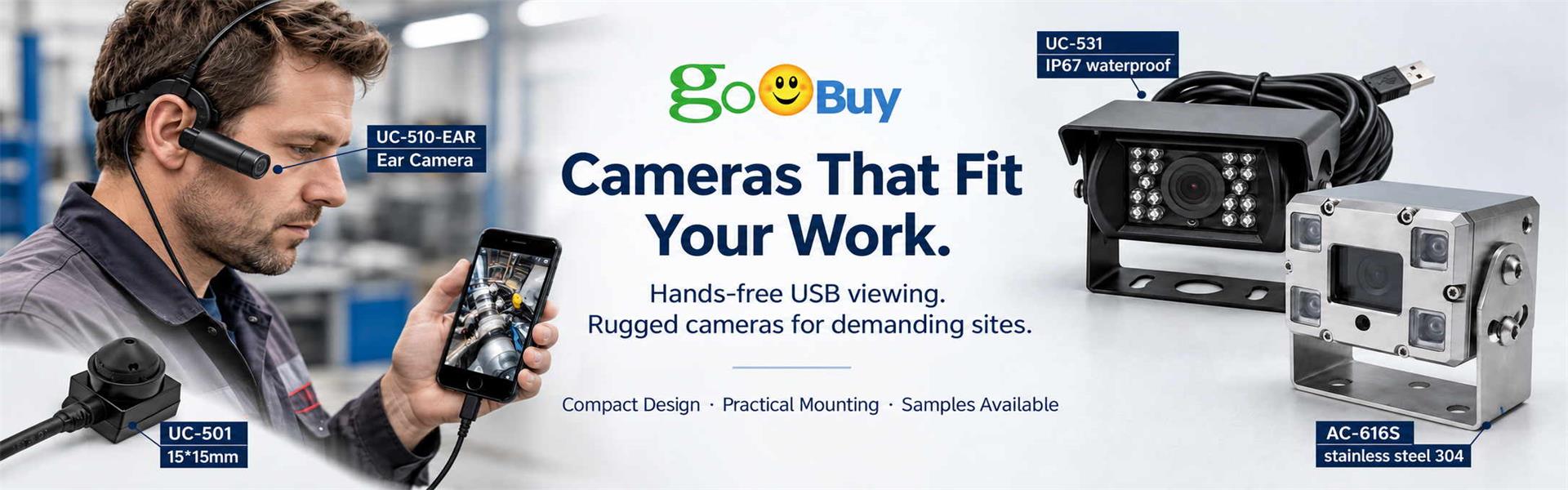
A POV camera differs from a phone camera mainly in where the camera can be positioned: a wearable POV camera moves with the operator and provides a first-person view while both hands remain available, whereas a phone camera usually requires handheld use or a fixed mounting position.
A modern smartphone may have a better camera than many compact external cameras. It may offer higher resolution, better autofocus, stronger image stabilization and more advanced image processing.
So why would a technician, repair worker or field-service team use a separate POV camera?
For many hands-on tasks, the answer is not better image quality. It is better camera position.
A phone camera stays with the phone. A wearable POV camera can move the camera closer to the operator's viewing position, allowing the user to record repair, inspection, maintenance or training work while keeping both hands available.
That difference in viewpoint can matter more than resolution when the purpose of the video is to show what the operator is doing.
A smartphone and a wearable POV camera solve different recording problems.
A phone is an excellent general-purpose camera. It is convenient for taking photos, intentionally framing a close-up, recording a finished result or capturing a scene from a fixed position.
The limitation appears when the person operating the camera also needs to perform the work.
| Comparison | Phone Camera | Wearable POV Camera |
|---|---|---|
| Camera position | Fixed to the phone | Worn near the operator's viewing direction |
| Hands-free work | Usually requires a stand or another person | Designed to keep both hands available |
| First-person view | Difficult to maintain while working | Camera moves with the operator |
| Close-up framing | Easy when intentionally held and positioned | Depends on head position, FOV and working distance |
| Image quality | Often excellent | Depends on the external camera |
| Autofocus & stabilization | Usually strong on modern phones | May be more limited |
| Host device | Phone itself | May still use the Android phone as host |
| Extra hardware | Stand may be needed for hands-free recording | Wearable camera and cable are required |
| Best fit | General photography and fixed recording | Hands-on work and first-person documentation |
The important point is that a POV camera does not have to replace the smartphone.
In a USB-C Android workflow, the two can work together:
Android Phone = Display / Recording Host
Wearable POV Camera = Camera Viewpoint
Consider a technician repairing equipment on a workbench.
If the technician records with the phone in one hand, only one hand remains available for tools, connectors and components.
If the phone is placed on a tripod or stand, both hands become available—but the camera now sees the work from one fixed position.
When the technician moves to the other side of the equipment, leans closer to inspect a connector or turns toward another component, the fixed phone camera does not automatically follow.
A wearable first-person camera changes that relationship.
The camera moves with the technician.
This does not automatically make the image sharper or more stable. Instead, it changes what the video can see and how the user can work while recording it.
For repair and field-service documentation, that can be the more important difference.
Imagine an electronics technician replacing a component inside a device.
The technician can place the phone above the workbench.
This may produce a stable, high-quality image.
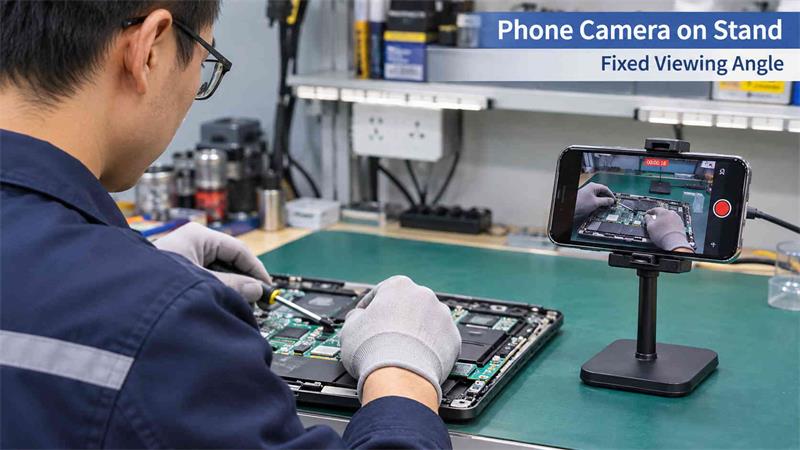
But several problems can occur:
Hands or tools may block the component.
The technician may move outside the original frame.
A small connector may be difficult to see from the fixed angle.
The phone may need to be repositioned during the procedure.
Holding the phone for a closer view interrupts the repair.
For planned demonstrations, this may be completely acceptable. A well-positioned phone can actually produce the better video.
A camera worn near the head follows the technician's movement.
When the technician looks toward the connector, circuit board or tool, the camera viewpoint moves in approximately the same direction.
Both hands remain available for the task.
This can be useful when the goal is to document:
repair steps,
equipment inspection,
component replacement,
field maintenance,
installation procedures,
after-sales service work,
or hands-on technical training.
The benefit is not simply “hands-free video.”
It is the combination of hands-free operation + first-person camera position.
There is an important limitation.
A wearable camera does not capture exactly what the human eye sees.
Its position is offset from the eye, and the recorded area depends on camera angle, field of view, working distance and how the camera is worn.
If the wearer looks only with their eyes without moving their head, the camera may not follow that exact direction.
For this reason, a POV camera should be tested during the actual work rather than judged only from resolution specifications.
A useful evaluation should ask:
Can the camera consistently see the hands, tools and component being worked on?
That is usually more meaningful than asking only whether the camera is 1080P or 4K.
A POV camera is not automatically better.
A modern phone camera may be preferable when:
maximum image quality is the priority;
strong autofocus is required for rapidly changing distances;
advanced image stabilization is important;
the camera can remain in one fixed position;
someone else can operate the camera;
the user needs carefully framed close-up photos;
no wearable cable or external device is desired.
For example, if a company wants to record a polished training video at a controlled workstation, a smartphone on a good stand may provide excellent results.
There is no reason to add another camera simply because it is wearable.
A wearable camera becomes more useful when the recording position needs to move with the person doing the work.
Typical situations include:
A technician moves around equipment while checking different components and using both hands for tools.
A repair business wants to document what the technician did without repeatedly stopping the repair to reposition a phone.
An inspector needs the camera viewpoint to follow where they are looking while opening panels, checking connections or examining different parts of equipment.
An experienced technician can record a procedure from approximately their own working perspective, helping trainees see the sequence of hands, tools and components.
In these situations, camera position becomes part of the workflow, not simply a photography decision.
The easiest way to understand the difference is to record the same task from both positions.
Place a smartphone on a stand and record a technician performing a short repair.
Then record the same procedure using a wearable POV camera.
Compare the footage for four questions:
Can you see the component being worked on?
Can you see what the technician's hands are doing?
Does the camera follow the work when the technician changes position?
Does recording interfere with the technician's normal work?
This type of real-world comparison is more useful than comparing camera specifications alone.
Goobuy UC-510-EAR is a compact ear-worn USB POV camera designed for businesses that already use compatible Android phones or tablets and need an additional first-person camera position.
The standard configuration provides:
2MP 1080P video
USB 2.0 UVC interface
USB-C connection
90° field of view
3.6mm standard lens
120cm cable
approximately 41g camera weight

The Android device remains the host for live viewing and, when supported by the selected UVC application, video recording.
The purpose is therefore not to replace a good smartphone camera.
It is to move the camera away from the phone and closer to the work.
UC-510-EAR is not the right solution for every POV recording requirement.
It is a wired external USB camera, not a completely wireless standalone recorder.
It depends on a compatible Android host with USB OTG / USB Host support and a suitable UVC camera application.
The cable, wearing position and camera angle also need to work comfortably with the user's actual task.
And successful operation in a UVC camera app does not automatically mean that every Android conferencing, streaming or remote-assistance application can directly use the external camera.
These points should be tested before team deployment.
For professional users, we recommend evaluating a wearable camera around the actual job rather than starting with megapixels.
Check:
Camera position: Does the recorded view show the real work area?
Working distance: Are hands, tools and components visible at the normal working distance?
Field of view: Is the image wide enough to retain context without making important details too small?
Wearing stability: Does the camera maintain a useful direction as the technician moves?
Cable routing: Does the USB cable interfere with normal work?
Android compatibility: Does the intended phone or tablet recognize the UVC camera correctly?
Recording workflow: Does the selected app provide the required viewing and recording functions?
A camera that passes these tests may be more useful for the task than a higher-resolution camera placed in the wrong position.
Not generally.
For image quality, autofocus, stabilization, convenience and general photography, a modern smartphone can be the better camera.
But that is not the complete question.
For hands-on work, the more useful question is:
Where does the camera need to be while the person is doing the job?
If a fixed phone view already shows everything clearly, use the phone.
If the camera needs to move with the technician while both hands remain available, a wearable POV camera can provide a more practical viewpoint.
That is the reason camera position matters.
For companies evaluating this workflow, Goobuy UC-510-EAR can be tested with the actual Android device, UVC app and work procedure before wider deployment. A 2pcs sample evaluation is a practical way to verify camera position, field of view, wearing stability, cable routing and Android compatibility in the real working environment.
this article is updated by shenzhen novel electronics limited in Nov 9th, 2026
Follow Me
Address:A615, 6F, Huachuangda Building, No107 Xinghua 1st Road, 43 District, Xinan street, Baoan, shenzhen, China 518101