
A USB-C POV camera is an external wearable camera that connects to a compatible Android phone or tablet for hands-free first-person video recording through a supported UVC application. Unlike a standalone action camera, it relies on the connected host for power, live preview and video storage. For field service technicians who already use Android devices, a USB-C POV camera offers a compact alternative for repair documentation, equipment maintenance, installation recording and hands-free work instructions.
When choosing a hands-free camera for field service work, the right option depends on how technicians need to record, where the video will be used, and whether the company already uses Android phones or tablets.
An action camera is generally better for standalone recording, wireless operation, and situations where an independent camera is preferred. A USB-C POV camera, such as Goobuy UC-510-EAR, is designed for a different workflow: connecting a compact wearable camera to a compatible Android host for first-person video preview and recording through supported UVC software.
For field technicians who already carry Android devices and need a compact camera positioned near their line of sight, a USB-C POV camera may offer a more practical solution.
Field service technicians frequently need both hands to perform their work.
Common situations include:
Electrical equipment inspection and maintenance
HVAC and refrigeration servicing
Industrial equipment troubleshooting
Machinery installation and adjustment
Electronic device repair
On-site technical support
Maintenance documentation and training
Using a conventional smartphone camera creates a practical problem.
The phone must be held, placed somewhere nearby, or operated by another person. Even when a tripod or phone holder is available, the camera position may not follow the technician's actual working perspective.
A wearable POV camera offers another approach.
The camera is positioned near the technician's viewing direction, allowing the technician to keep both hands available while capturing the work process.
However, not every wearable camera uses the same recording architecture. This is where the difference between an action camera and a USB-C POV camera becomes important.
Both camera types can capture first-person video, but their hardware architecture and operating workflows are different.
| Comparison | Standalone Action Camera | USB-C POV Camera |
|---|---|---|
| Camera operation | Independent camera system | External camera connected to a host |
| Power | Usually built-in rechargeable battery | Typically powered through the connected host |
| Video storage | Usually internal or removable storage | Saved through a compatible host and recording app |
| Live preview | Depends on camera display and connectivity features | Available through a compatible UVC application |
| Camera size | Varies by model; often includes a larger recording unit | Can use a compact external camera head |
| Wireless operation | Available on many models | Requires a physical USB connection |
| Smartphone dependency | Not necessarily required for recording | Requires a compatible Android host |
| Recording workflow | Camera operates independently | Camera, USB connection, host device and compatible software work together |
| Typical application | Sports, outdoor recording and standalone video capture | Hands-free documentation within an existing Android workflow |
The important difference is not simply camera resolution.
It is how the camera fits into the technician's existing working environment.
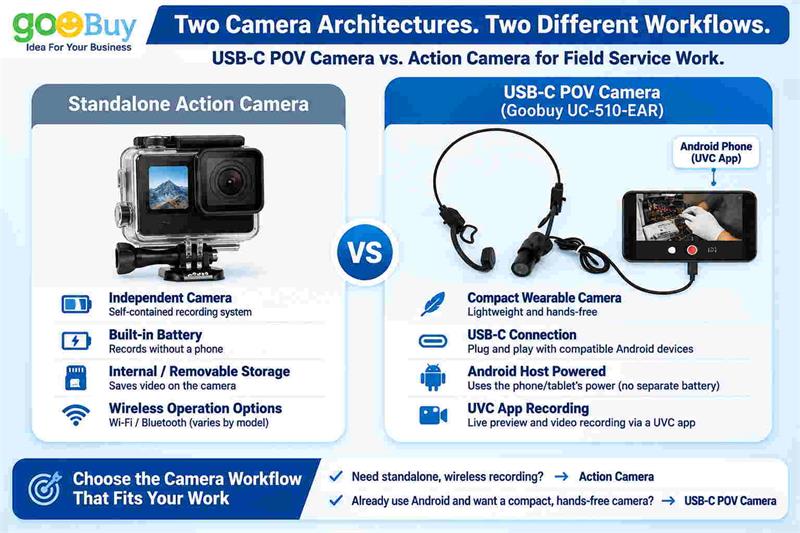
An action camera is often the better option when the user needs an independent recording device.
Consider an action camera if your requirements include:
Standalone recording
You want to turn on the camera and record without connecting an Android phone or tablet.
Wireless operation
You prefer a cable-free setup and greater freedom of movement.
Independent storage
You want video files recorded directly onto the camera's own storage.
Outdoor and mobile recording
Your work involves outdoor activities, vehicle-mounted recording, or environments where a self-contained camera system is more convenient.
A dedicated camera platform
You prefer a complete camera with its own controls, battery and recording functions.
For these requirements, a USB-C POV camera may not be the appropriate alternative.
It depends on an external host device and cannot provide the same standalone operating experience.
A USB-C POV camera is worth considering when your company already has compatible Android devices and wants to add a compact external camera to its existing workflow.
There are several practical advantages.
Instead of purchasing another independent recording system, a technician can use a compatible Android smartphone or tablet as the camera host.
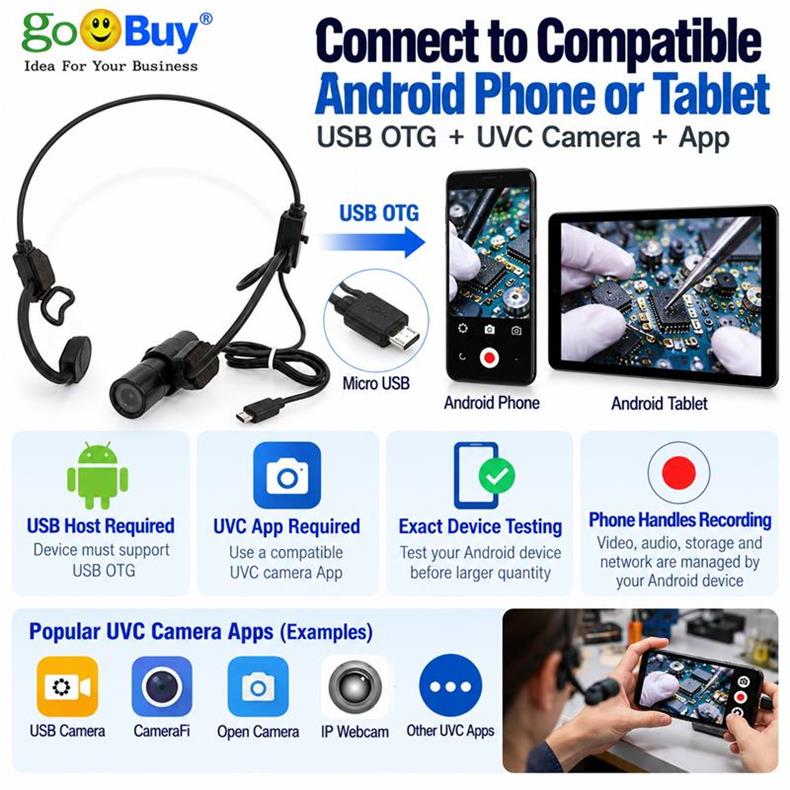
The general connection workflow is:
USB-C POV Camera → USB-C Connection → Android Device → Compatible UVC App → Video Preview and Recording
This approach can reduce the number of separate devices required for a basic recording setup.
However, Android USB Host support, UVC compatibility, application support and available power must be verified for the specific device.
For field service work, camera positioning can be more important than having a large standalone camera.
A compact wearable camera can be positioned near the technician's viewing direction, helping capture what the technician is actually working on.
This can be useful for:
Recording equipment repair procedures
Documenting installation steps
Capturing maintenance operations
Recording troubleshooting activities
Creating internal technical training materials
The objective is to capture the work process without requiring the technician to continuously hold a smartphone.
Some service companies already use Android smartphones or tablets for work orders, inspection records, communication and technical documentation.
A USB-C camera can potentially become another external video input within that environment.
Rather than introducing a completely independent recording platform, the company can evaluate whether an external UVC camera fits its existing workflow.
This is particularly relevant when the intended application does not require wireless standalone recording.
These are important questions before choosing either camera type.
Power requirements
An action camera generally operates using its own battery.
A USB-C POV camera typically receives power from the connected Android device. Actual operating time depends on the host's battery capacity, USB power availability, application behavior and other device conditions.
For extended recording sessions, power consumption should be tested under actual working conditions.
Video storage
Action cameras usually store recordings on their own internal or removable storage.
A USB-C POV camera relies on the connected Android device and compatible recording software to save video files.
Before deployment, confirm:
Available storage capacity
Recording resolution and frame rate
Supported video formats
Recording application stability
File saving and export procedures
Recording reliability
For professional field service use, test the complete recording workflow rather than evaluating the camera alone.
A camera that works in a short preview test may behave differently during extended recording.
A USB-C connector alone does not guarantee compatibility.
Before selecting a USB-C POV camera, check the following:
USB Host Support: Does the Android phone or tablet support external USB cameras?
UVC Compatibility: Can the device recognize a standard UVC USB camera?
Recording App: Does the selected UVC application support both live preview and video recording?
USB Power: Can the Android device supply sufficient power during operation?
Video Format: Does the camera's output format match the application's supported formats?
Physical Setup: Is the camera positioning and cable arrangement suitable for the technician's work?
One important distinction:
Being able to display a USB camera in a UVC application does not automatically mean that every video conferencing, remote assistance or business application can access that camera directly.
If your workflow depends on a particular software platform, test that exact combination before purchasing in quantity.
Here is a practical selection guide.
| Your Requirement | Recommended Direction |
|---|---|
| Independent recording without a smartphone | Action Camera |
| Wireless recording | Action Camera |
| Built-in battery and independent storage | Action Camera |
| Existing Android phone or tablet available | Consider USB-C POV Camera |
| Compact external wearable camera | Consider USB-C POV Camera |
| Hands-free maintenance documentation | Either, depending on mounting and workflow |
| Long recording without depending on phone power | Action Camera may be more suitable |
| Adding an external camera to an existing Android workflow | USB-C POV Camera |
There is no universal winner.
The right solution is the one that matches the technician's actual working conditions, recording requirements and existing equipment.
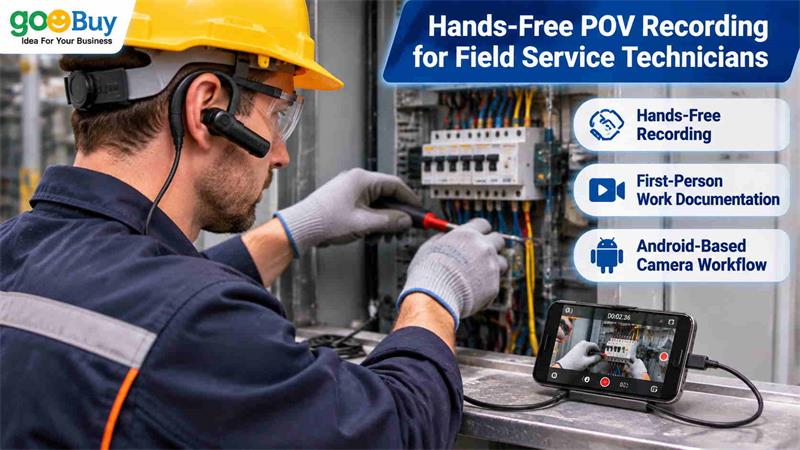
Goobuy UC-510-EAR is a compact wearable USB camera designed for hands-free first-person video applications.
Instead of functioning as an independent action camera, it connects to a compatible Android host through USB-C and works with supported UVC camera applications.
This configuration is intended for users who want to add an external wearable camera without purchasing a completely separate standalone recording system.
Potential applications include:
Field service and equipment maintenance
Repair procedure documentation
Technical training and demonstrations
Hands-free inspection recording
On-site service documentation
First-person work process capture
For companies evaluating a wearable USB camera, Goobuy offers an existing product platform that can be tested before considering a larger team deployment.
The most practical starting point is to evaluate the camera with the actual Android device, recording application and working environment.
Q1. Is a USB-C POV camera better than a GoPro for field service technicians?
Not necessarily. A GoPro-style action camera is generally more suitable for independent recording, wireless operation and self-contained storage. A USB-C POV camera is more suitable when a technician already uses a compatible Android device and wants to add a compact external camera to that workflow. The best choice depends on whether standalone operation or integration with an existing Android system is more important.
Q2. Can a USB-C POV camera record video without an Android phone?
No. A standard USB-C UVC POV camera such as Goobuy UC-510-EAR requires a compatible USB host device. It is not an independent action camera with its own standalone recording and storage system.
Q3. Does a USB-C POV camera use the Android phone's battery?
Typically, yes. The connected Android host supplies power to the external USB camera. Actual battery consumption depends on the phone, camera configuration, recording application and operating conditions.
Q4. Can I save first-person repair videos directly to my Android phone?
Yes, when the Android device recognizes the camera and the selected UVC recording application supports saving video files. Available storage, recording formats and application functionality should be checked before deployment.
Q5. Can I use a USB-C POV camera with Zoom, Microsoft Teams or remote assistance software?
Not automatically. UVC compatibility with a camera application does not guarantee that every conferencing or remote assistance application can directly access the external camera. The specific Android device and software combination must be tested.
Q6. Is a wearable USB camera suitable for a field service team rather than individual users?
It can be suitable when multiple technicians use compatible Android devices and have similar recording requirements. Companies should first evaluate camera positioning, USB compatibility, recording software and video quality with a small number of samples before deploying the solution across a team.
If your technicians already use Android smartphones or tablets and need a compact hands-free camera for maintenance, repair documentation or first-person work recording, Goobuy UC-510-EAR USB camera is worth evaluating.
You do not need to start with a large deployment.
A practical evaluation can begin with two sample units to check:
Android device compatibility
UVC application functionality
Camera positioning and wearing comfort
Actual video quality during field operations
Recording duration and file management
Once the configuration is validated, your company can evaluate a 10–30 unit team purchase.
Contact Goobuy to request 2pcs UC-510-EAR samples or obtain pricing for 10/30pcs quantities.
Share your Android device model, intended recording application and field service requirements so we can help assess whether this USB-C POV camera fits your workflow.
About Goobuy
Goobuy (Shenzhen Novel Electronics Limited) develops and supplies compact USB camera solutions for commercial and professional applications. Our product platforms include miniature USB cameras, USB-C external cameras and wearable camera configurations.
We focus on practical camera integration using existing product platforms, helping customers evaluate camera compatibility, positioning, interfaces and application requirements before moving into sample testing and small-batch purchasing.
Follow Me
Address:A615, 6F, Huachuangda Building, No107 Xinghua 1st Road, 43 District, Xinan street, Baoan, shenzhen, China 518101