

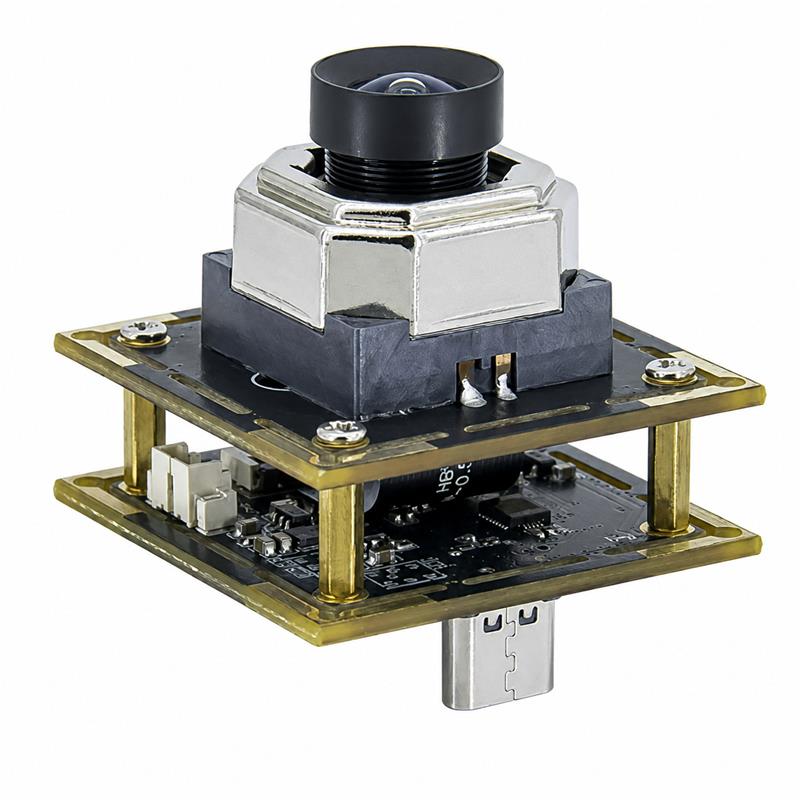
Built for U.S. RMA and ITAD operations, this enclosed 4K USB-C camera helps capture serial numbers, asset tags, labels, defects and repair evidence across multiple workstations
Goobuy 4K autofocus USB-C workstation camera is a standard enclosed camera used by RMA centers, e-commerce returns teams, ITAD operators and depot repair service providers to capture clear visual evidence of serial numbers, asset tags, labels, packaging damage, cosmetic defects and repair records without BOM integration or custom software development
This 4K autofocus USB-C workstation camera is designed for operations teams that need clear photo documentation of serial numbers, asset tags, product labels, cosmetic defects, packaging damage, missing accessories, and repair evidence — without BOM integration, driver development, or custom software work.
For RMA centers, e-commerce returns operations, electronics refurbishment facilities, ITAD service providers, and depot repair teams, ordinary webcams or smartphone photos often create inconsistent image quality, blurry close-up details, and weak visual evidence for customer disputes, warranty claims, asset grading, and repair records.
This product is not positioned as a robotics camera, AI camera, surveillance camera, or custom embedded camera module. It is a standard enclosed USB-C camera for practical PC-based workstation deployment.
The Goobuy Autofocus IMX678 USB3-C Camera is a standard enclosed 4K camera head for visual documentation workstations. It combines a Sony IMX678 low-light image sensor, autofocus lens, USB3.0 Type-C interface, UVC plug-and-play compatibility, and a practical low-distortion field of view for close-range inspection benches.
Unlike a bare camera board that requires mechanical design, driver integration, and long engineering evaluation, this product is designed for fast sample testing. Operations teams can connect it to a Windows or Linux workstation, open a standard camera app or browser-based capture page, and test it with real objects such as serial numbers, asset tags, product labels, screen scratches, packaging damage, missing accessories, or repair evidence.
This makes it suitable for companies searching for:
This camera is built for returns processing centers, reverse logistics operators, warranty service teams, and RMA inspection stations that need to document product condition before refund, repair, replacement, restocking, or disposal decisions.
Typical capture tasks include:
For operations managers asking “What camera should we use for RMA inspection workstations?” or “How can we capture clear photos for e-commerce returns photo documentation?”, this camera provides a ready-to-test workstation solution.
This camera is also designed for electronics refurbishment centers, ITAD operators, mobile device repair providers, laptop refurbishment companies, warranty service centers, and depot repair service providers.
Typical capture tasks include:
For companies searching “best camera for electronics refurbishment inspection benches”, “camera for ITAD asset photo documentation”, or “4K autofocus camera for repair bench documentation”, this product is designed for repeated PC-based workstation use.
Many RMA, returns, ITAD, and repair teams already use webcams, smartphones, document cameras, or manual photo workflows. These tools may work for occasional snapshots, but they often create problems when a company needs repeatable image capture across many workstations.
Common problems include:
This camera is designed to help operations teams create a more consistent photo documentation process across inspection, grading, repair, and RMA stations.
Designed for close-range workstation imaging where operators need to capture labels, defects, devices, packaging, documents, and repair evidence at different distances.
Useful for warehouse benches, repair stations, refurbishment centers, and mixed-light environments where ordinary webcams may produce noisy or unclear images.
Easy to connect with PC-based RMA stations, repair benches, ITAD grading desks, inspection terminals, and browser-based capture systems.
No custom driver or SDK is required for basic image capture. The camera can be tested with standard camera apps, browser capture pages, OBS, VLC, and many PC-based workflows.
Supplied as an enclosed camera unit for workstation installation, avoiding the handling risks and integration delays of bare camera boards.
A practical field of view for inspection benches and documentation workstations, providing useful coverage without the heavy distortion of fisheye cameras.
The product is mainly supplied as a standard configuration with matched sensor, lens, enclosure, USB-C interface, and autofocus profile to support consistent repeat orders.
For operations with many receiving, inspection, grading, repair, or documentation stations, one camera can be installed at each workstation after sample approval.
This following raw test video shows the daytime long-distance autofocus imaging reference of the Goobuy IMX678 4K autofocus USB-C camera. It is provided for operations managers, product managers, repair bench teams, ITAD operators, RMA centers, e-commerce returns facilities, field service teams and workstation integrators who need to evaluate 4K image clarity, autofocus behavior, UVC compatibility and real-world visual documentation performance before sample testing or multi-station rollout.
Technical Specifications
| Item | Specification |
|---|---|
| Sensor | Sony IMX678 CMOS image sensor |
| Resolution | 4K image capture |
| Video Interface | USB3.0 Type-C |
| Focus Type | Autofocus |
| Lens | Low-distortion wide-angle lens |
| Field of View | Approximately 93°, depending on confirmed lens configuration |
| Camera Format | Enclosed USB-C workstation camera |
| Compatibility | UVC plug-and-play |
| Operating Systems | Windows / Linux support for standard UVC camera capture |
| Typical Use Distance | Close-range workstation inspection and documentation |
| Main Applications | RMA, e-commerce returns, electronics refurbishment, ITAD, depot repair |
| Positioning | Standard product for workstation deployment, not custom BOM integration |
Final specifications may vary according to confirmed product configuration. For volume deployment, customers should test one sample using their real workstation objects, lighting, software, and mounting environment.
This camera is designed for simple workstation testing before volume purchase
| Workflow | Compatibility Notes |
|---|---|
| Windows Camera App | Can be tested as a standard UVC camera |
| Linux UVC / V4L2 | Can be tested in standard Linux camera workflows |
| Browser-Based Capture | Can be tested with browser camera access where supported |
| OBS / VLC | Can be tested as a standard USB video device |
| RMA Software | Depends on whether the software supports USB camera input |
| Repair Management System | Depends on the customer’s capture workflow |
| ITAD Reporting System | Depends on system camera access and image capture settings |
For basic visual capture, no driver or SDK development is required. For integration into proprietary RMA, ITAD, repair, or reporting software, customers should confirm compatibility with their own software team or platform provider.
This camera can be supplied as an enclosed camera head for practical workstation installation.
Typical deployment methods include:
For 50+ workstation rollout, we recommend testing:
The final enclosure, mounting hole position, bracket method, and cable length should be confirmed before volume order.
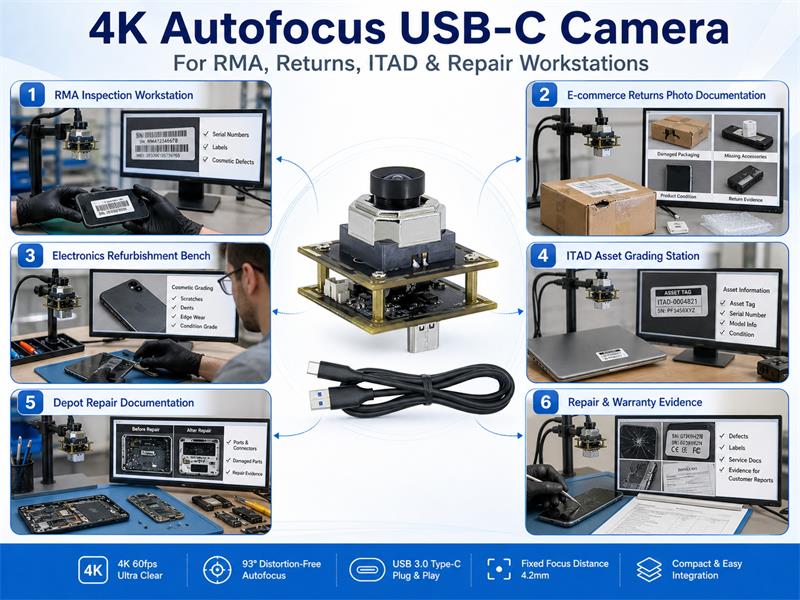
Returns processing teams often need to verify whether a returned product is complete, damaged, used, mislabeled, missing accessories, or different from the original shipped item. If photo evidence is blurry or inconsistent, refund review, customer service, warranty claims, and internal quality control become more difficult.
This 4K autofocus USB-C camera helps RMA and returns operations capture clear images of:
For companies asking “How can we capture clear photos for RMA inspection workstations?” or “What camera should we use for e-commerce returns photo documentation?”, this camera offers a practical workstation-level solution.
Electronics refurbishment and ITAD operations often process large volumes of phones, tablets, laptops, network devices, CPE products, and enterprise IT assets. Each device may need asset tracking, grading, repair evidence, customer reporting, or resale documentation.
This camera helps capture:
For operators searching “best camera for electronics refurbishment inspection benches”, “camera for ITAD asset photo documentation”, or “4K autofocus camera for repair bench documentation”, this product is designed for repeated PC-based workstation use.
To avoid the wrong application fit, this camera should be understood clearly.
This camera does not automatically perform:
It provides high-quality visual input. The final inspection decision, image storage, OCR, barcode reading, AI analysis, or reporting workflow depends on the customer’s own software and operational process.
This camera is best suited for:
If your team needs a standard 4K autofocus USB-C camera for RMA returns, electronics refurbishment, ITAD asset grading, depot repair documentation, or warranty repair benches, we recommend starting with one sample test.
Use your real products, real labels, real lighting, real workstation software, and real mounting environment. If the sample meets your requirements, the same standard configuration can be considered for pilot deployment and 50+ multi-station rollout.
Tell us your application, test objects, number of workstations, current capture method, and target first-order quantity. Our team will help confirm whether this standard camera is suitable for your visual documentation workflow.
This product is mainly positioned as a standard enclosed workstation camera, not a custom BOM camera module. It is designed for PC-based visual documentation in RMA, e-commerce returns, electronics refurbishment, ITAD and depot repair workstations.
Yes. The camera supports UVC plug-and-play for standard PC testing. For basic image capture, customers can test it with Windows or Linux camera apps, browser-based capture pages, OBS, VLC or existing PC-based inspection workflows without driver or SDK development.
For RMA and e-commerce returns workstations, a 4K autofocus USB-C camera is useful when operators need to capture serial numbers, product labels, cosmetic defects, missing accessories, packaging damage and customer dispute evidence. This camera is designed for that type of visual documentation workflow.
Autofocus is helpful when operators capture objects at different distances and heights, such as product labels, serial numbers, mobile devices, laptop ports, packaging damage and repair evidence. It reduces the chance of blurry images when capture distance changes during daily operation.
Yes. Electronics refurbishment centers, ITAD service providers and depot repair operators can use this camera to capture asset tags, serial numbers, cosmetic defects, screen scratches, ports, labels and before-and-after repair evidence.
Yes. Depot repair teams can use it as a repair bench camera to document device condition before repair, capture damaged parts, record serial numbers and provide visual evidence after repair or refurbishment.
No. The camera provides high-quality image capture. OCR, barcode decoding, AI defect detection, product grading, fraud detection, report generation and inspection decisions depend on the customer’s own software and workflow.
 office@okgoobuy.com
Follow Me
Address:A615, 6F, Huachuangda Building, No107 Xinghua 1st Road, 43 District, Xinan street, Baoan, shenzhen, China 518101