
A compact USB/UVC camera module can be used as a camera-side hardware option for research wearable recording systems, Raspberry Pi video capture devices, Linux embedded hosts and small multi-camera prototypes. Goobuy UC-501 can be evaluated when researchers or device builders need a small camera head with flexible lens options, USB video input, MJPEG / YUY2 format selection and practical cable routing, while the customer remains responsible for the host system, recording software, GPS/IMU synchronization, wearable structure and final validation.
A compact USB camera for research wearable recording systems is a small UVC camera head that can be evaluated with Raspberry Pi, Linux, embedded hosts or custom recording devices when researchers need flexible lens options, easier cable routing than MIPI/CSI ribbon cameras, and standard USB video input for prototype validation.
Goobuy UC-501 can be evaluated as a camera-side hardware option for wearable prototypes, research recording devices, small multi-camera systems and embedded video capture projects.
This page is written for research teams, device builders and embedded system developers who already have a host platform and need a compact camera module for evaluation.
Goobuy does not provide the complete wearable device, recording software, GPS/IMU synchronization, animal tracking algorithm, battery system, data pipeline or final research validation.
Our role is the camera-side hardware layer:
camera module, lens option, cable direction, connector discussion, USB/UVC video input and sample configuration.
Many research recording devices begin as prototypes.
The first camera choice may be based on what is easy to test on a bench:
a Raspberry Pi camera;
a MIPI/CSI ribbon camera;
a standard USB webcam;
a small board camera;
a consumer action camera;
a low-cost camera module.
These options may work for early proof-of-concept testing.
But when the device becomes wearable, portable, battery-powered, field-deployed or multi-camera, the real camera questions become more practical:
Can the camera head fit the wearable structure?
Can the cable survive bending, routing and assembly?
Can the host recognize the camera reliably?
Is USB easier to route or shield than a fragile ribbon cable?
Does the lens provide the right field of view?
Is the depth of field acceptable?
Is MJPEG better than YUY2 for USB bandwidth?
Can multiple cameras work on the same host?
Does the camera interfere with GPS, IMU, wireless modules or power systems?
Can the camera be validated in the real device, not only on the desk?
This is why camera selection for research wearable systems should be treated as an integration problem, not only a sensor problem.
A compact USB/UVC camera may be useful when the research device already has a host that can accept standard USB video.
Typical host directions include:
Raspberry Pi;
Linux embedded boards;
industrial Linux hosts;
mini PCs;
Android-based embedded systems;
Windows recording computers;
custom data loggers with USB video input;
edge devices used for field recording;
prototype recording boxes.
USB/UVC can be helpful because many operating systems can recognize standard USB video devices without special MIPI/CSI driver development.
However, USB is not automatically better for every project.
USB bandwidth, power stability, cable routing, EMI, camera identification and recording software must still be tested in the real system.
MIPI/CSI camera modules are common in embedded development. They can be compact and efficient, but the ribbon cable and host-specific driver path can become difficult in some wearable or field devices.
Some research teams evaluate USB/UVC camera heads because USB may offer:
more flexible cable routing;
easier replacement during prototype testing;
standard video input on Linux or Raspberry Pi;
longer practical cable options than fragile ribbon paths;
simpler host recognition for early testing;
easier separation between camera head and recording electronics;
more mechanical freedom in wearable structures.
But USB also introduces its own trade-offs:
bandwidth limits;
power supply stability;
connector retention;
cable shielding;
possible EMI influence;
multi-camera device identification;
frame-rate and compression trade-offs.
The best choice depends on the host, recording software, power design, enclosure and field validation plan.
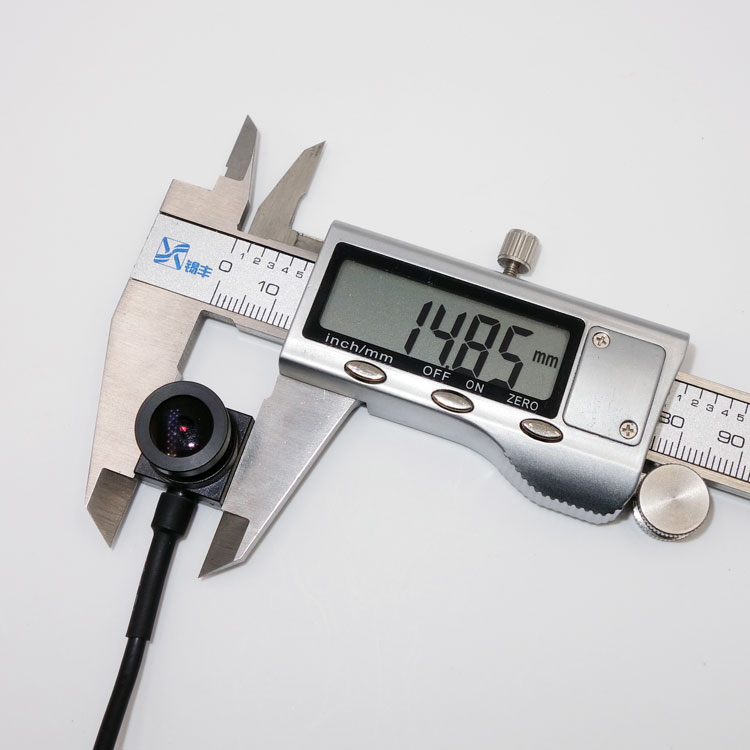
Goobuy UC-501 is a compact USB camera module that can be evaluated when a project needs a small camera head with standard UVC video output.
Typical camera-side reasons to evaluate UC-501 include:
compact camera head size;
USB/UVC video input;
2MP / 1080P camera direction;
M12 lens flexibility;
wide-angle, fisheye or pinhole-style lens options;
MJPEG / YUY2 format selection;
cable length and routing discussion;
support for embedded host evaluation;
potential use in Raspberry Pi / Linux-based video capture projects;
easier sample testing than a fully custom camera system.
UC-501 is not a finished wearable recording system.
It is a camera-side component that can be evaluated inside the customer’s prototype.
The final performance depends on the host, lens, lighting, cable, software, storage, power system and mechanical structure.
UC-501 can be evaluated as a compact USB/UVC camera head for research devices, embedded recording systems, wearable prototypes and Raspberry Pi / Linux-based video capture projects where the customer needs a small camera module with flexible lens options.
Typical evaluation points include:
small camera head size;
USB/UVC video input;
wide-angle, fisheye or pinhole lens options;
MJPEG / YUY2 format selection;
cable routing and shielding;
multi-camera USB bandwidth;
Linux device recognition;
FOV vs depth-of-field trade-off.
Goobuy provides the camera-side hardware and lens options.
The host system, recording software, GPS/IMU synchronization, wearable structure and final validation should be handled by the customer.

In wearable research devices, lens choice is often more important than camera resolution.
A wider lens can capture more scene context, but it may also create stronger distortion and reduce useful detail near the edge of the image.
A fisheye lens can provide wide coverage, but it may require software correction if geometry matters.
A pinhole-style lens may fit a hidden or compact opening, but it may reduce light intake or limit FOV depending on the structure.
A narrow lens may show better detail at a specific distance, but it may miss surrounding context.
The research team should define:
target distance;
target size;
required scene coverage;
acceptable distortion;
available light;
depth-of-field requirement;
camera position on the wearable device;
whether software can correct distortion.
There is no universal lens for all wearable recording systems.
The lens should be selected for the real field task.
Multi-camera research systems need careful USB planning.
A single UC-501 camera may be simple to test, but two or more cameras on one host can create bandwidth, power and device-identification challenges.
Typical questions include:
How many cameras will run at the same time?
What resolution and frame rate are required?
Is MJPEG acceptable?
Is uncompressed YUY2 required?
Can the USB bus handle the total bandwidth?
Will cameras be connected through a hub?
Can the software identify each camera consistently?
Is synchronized recording required?
Does the host CPU handle compression or recording load?
Is storage speed sufficient for continuous capture?
For many multi-camera prototypes, MJPEG and reduced frame rate may be more practical than full uncompressed video.
The correct setting should be tested with the final host and recording software.
For wearable devices, the cable is not a small detail.
It can determine whether the prototype works reliably in real use.
Important cable-side considerations include:
cable bend radius;
strain relief;
connector retention;
cable exit direction;
shielding;
routing near GPS antennas;
routing near IMU, wireless modules or power lines;
mechanical protection;
user movement;
vibration;
repeated assembly and disassembly.
A camera that works on the bench may become unstable after the cable is bent, twisted or routed through a wearable structure.
Goobuy can discuss camera-side cable options, but the final wearable structure and cable management must be validated by the customer.
Some wearable recording systems also include GPS, IMU, sensors, wireless modules and timestamped video recording.
These functions are system-level responsibilities.
UC-501 can provide USB/UVC video input, but it does not provide:
GPS synchronization;
IMU synchronization;
timestamping software;
sensor fusion;
wireless data management;
storage architecture;
battery management;
complete wearable firmware;
research data pipeline.
The customer’s host system and software must handle synchronization and recording logic.
For serious research validation, the camera should be tested together with GPS, IMU, wireless and storage hardware to confirm that the complete device works as expected.
UC-501 may be a good starting point when the project needs:
a compact USB camera head;
UVC compatibility;
Raspberry Pi or Linux video capture;
wearable prototype camera input;
flexible lens selection;
wide-angle or fisheye evaluation;
small camera size;
simple embedded recording input;
sample-based validation;
camera-side hardware supply.
It can be useful for early prototype validation when the team wants to avoid a full custom camera development process at the beginning.
UC-501 may not be the right choice when the project requires:
medical-grade certification;
direct outdoor waterproof exposure without enclosure;
extreme low-temperature operation;
precise hardware trigger synchronization;
global shutter motion capture;
thermal imaging;
ultra-low-light night vision without illumination;
full wearable system design;
complete recording software development;
GPS/IMU synchronized data pipeline from the camera supplier;
guaranteed multi-camera synchronization without customer-side software validation.
In these cases, another camera platform or a system-level development partner may be required.
Goobuy can still discuss the camera-side direction, but the project boundary should be clear before sample selection.
A research team should test the camera in the real prototype, not only on a development desk.
Recommended validation points include:
host recognition;
video format;
resolution and frame rate;
USB bandwidth;
CPU and storage load;
cable stability;
connector reliability;
lens FOV;
depth of field;
image distortion;
lighting condition;
motion condition;
GPS / IMU coexistence;
battery runtime;
heat inside enclosure;
wearable mounting angle;
continuous recording duration;
data file stability.
The goal of the first sample is not to prove that every final problem is solved.
The goal is to confirm whether the camera platform is a practical starting point.
To recommend a useful UC-501 sample configuration, please send:
Host platform:
Raspberry Pi;
Linux board;
Windows PC;
Android host;
custom embedded host.
Recording requirement:
resolution;
frame rate;
MJPEG or YUY2;
continuous recording time;
storage method;
number of cameras.
Lens requirement:
working distance;
target size;
FOV;
wide-angle;
fisheye;
pinhole-style;
depth of field.
Mechanical requirement:
camera location;
available space;
cable path;
connector direction;
enclosure or wearable structure;
movement and vibration.
System boundary:
GPS;
IMU;
timestamping;
software capture;
battery;
wireless module;
field validation plan.
This information helps Goobuy suggest a practical camera-side sample instead of guessing from a general phrase like “wearable camera.”
Research wearable recording systems and Raspberry Pi-based capture devices need more than a small camera.
They need a camera-side configuration that fits the real host, lens requirement, cable route, mechanical structure and software workflow.
Goobuy UC-501 can be evaluated as a compact USB/UVC camera head for research devices, embedded recording systems, wearable prototypes and Raspberry Pi / Linux-based video capture projects.
It may help when the project needs a small camera head, flexible lens options, USB video input and sample-based validation.
But it does not replace the customer’s host design, recording software, GPS/IMU synchronization, wearable structure or final research validation.
The best project starts with a clear question:
What does the wearable device need to record, where will the camera be mounted, what host receives the video, what lens is required, and what must be validated before the next prototype?
If your research or embedded recording project needs a compact USB/UVC camera head, send Goobuy your host platform, lens requirement, cable route, recording workflow, number of cameras and sample plan.
Goobuy can help evaluate whether UC-501 is the right camera-side starting point.
Goobuy UC-501 can be evaluated as a USB/UVC camera module for Raspberry Pi, Linux and other embedded hosts that support standard UVC video input. The customer should validate device recognition, video format, frame rate, USB bandwidth, recording software, storage speed and long-duration stability on the real host system.
A USB/UVC camera may be easier to route, replace and test in some wearable prototypes because it avoids fragile short ribbon-cable paths and host-specific MIPI/CSI camera drivers. However, USB introduces its own engineering concerns, including cable shielding, connector retention, power stability, bandwidth limits and possible interference with other modules.
UC-501 may be evaluated as a USB camera-head alternative when the wearable device already has a suitable USB host. It should not be considered a direct drop-in replacement for every MIPI/CSI design. Mechanical space, cable path, power, EMI, image format, software capture and field reliability must be tested in the real prototype.
UC-501 can be evaluated with different M12 lens directions, including wide-angle, fisheye and pinhole-style options. Wide FOV improves scene coverage but may increase distortion and reduce edge detail. Pinhole-style lens designs may help with compact openings, but FOV, light intake and depth of field must be validated.
Researchers should define the target distance, target size, required scene coverage, acceptable distortion, lighting condition, depth-of-field need and mounting position. A wider FOV is not always better; it may capture more context but reduce useful detail for the target region.
Multiple UC-501 cameras may be tested on one host if USB bandwidth, host power, software capture, device identification and storage performance are handled correctly. For multi-camera recording, MJPEG or reduced resolution/frame rate may be more practical than uncompressed video. Final performance must be validated by the customer.
No. UC-501 provides USB/UVC video input. GPS synchronization, IMU synchronization, timestamping, sensor fusion, file management and research data alignment must be handled by the customer’s host hardware and recording software.
UC-501 USB camera may be evaluated as a camera-side module inside a protected research device or wearable housing. It should not be exposed directly to rain, mud, dust, impact or extreme temperature without a proper enclosure. Outdoor field performance depends on the final device design, lens window, cable protection, sealing, power and software validation.
MJPEG and YUY2 should both be evaluated according to the host system and recording workflow. MJPEG can reduce USB bandwidth but may increase compression-related processing or quality considerations. YUY2 is less compressed but requires more bandwidth and storage. The best format depends on resolution, frame rate, number of cameras and host capability.
Please send the host platform, operating system, number of cameras, target resolution and frame rate, required FOV, working distance, lens direction, available camera space, cable route, connector need, recording software plan, GPS/IMU requirement and prototype validation schedule.
Follow Me
Address:A615, 6F, Huachuangda Building, No107 Xinghua 1st Road, 43 District, Xinan street, Baoan, shenzhen, China 518101