

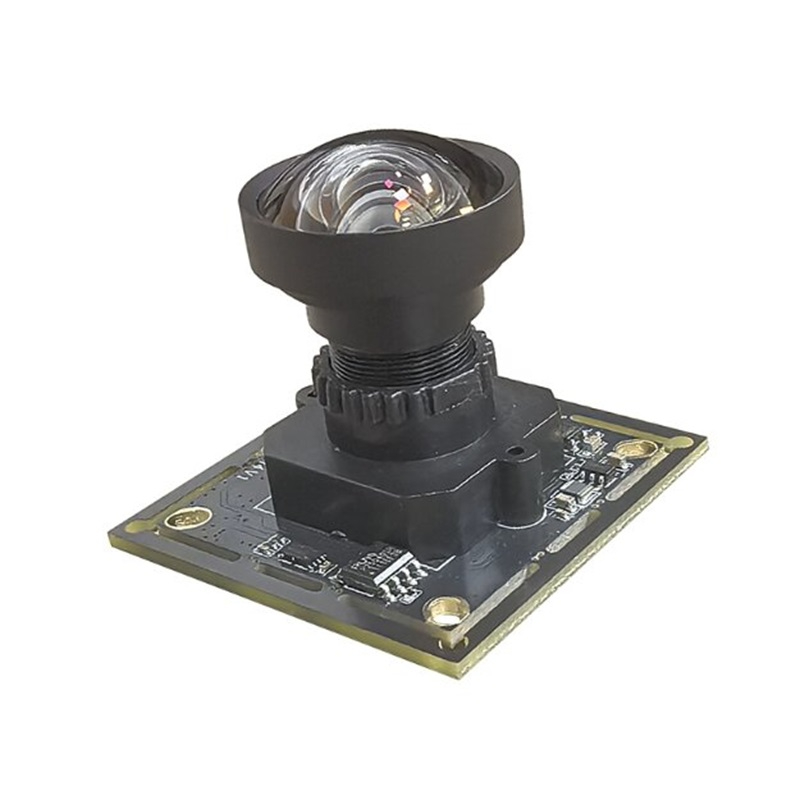
A fast way to evaluate 4K low-light imaging for U.S. projects. Built for robotics vision, edge AI, and compact industrial systems using a practical UVC workflow.
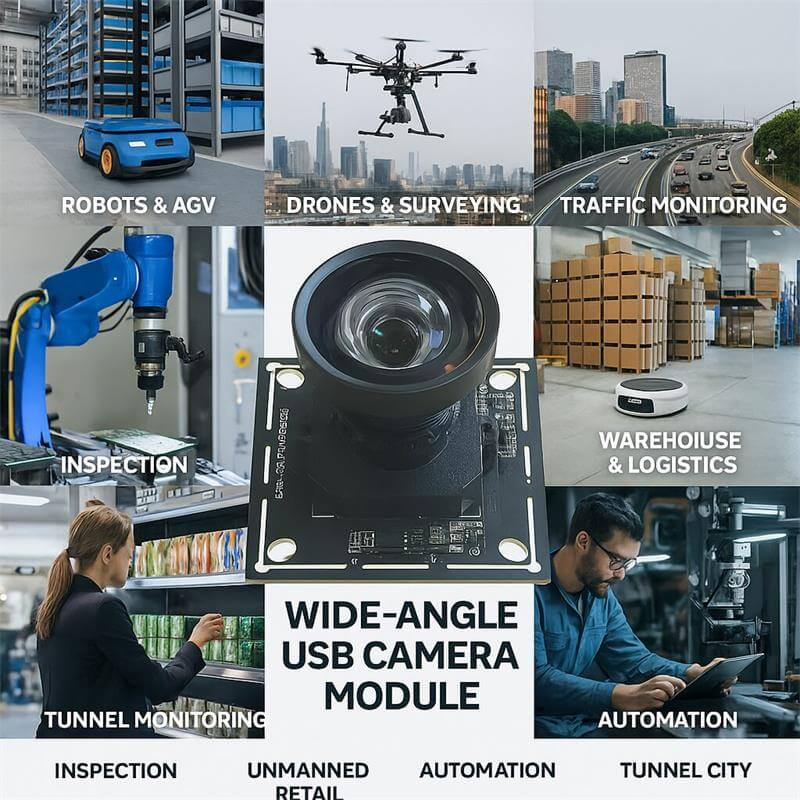
The Goobuy UCM-678-4K IMX678 USB2.0 camera is a 4K low-light UVC camera designed for robotics vision, Physical AI prototypes, and compact industrial imaging teams that need fast image validation without custom driver complexity, Engineered for the demanding requirements of USA & EU robotics and AI edge computing, this module delivers true 4K resolution and dual-exposure HDR over a universal USB 2.0 UVC pipeline.
Product Overview
The IMX678 USB2.0 camera Goobuy UCM-678-4K is a practical 4K UVC camera for robotics vision, Physical AI prototypes, and compact industrial imaging projects that need strong low-light performance without custom driver complexity. Built around Sony’s 1/1.8-inch IMX678 STARVIS 2 sensor with 2.0 μm pixels, it delivers cleaner image detail in dim, mixed-light, and backlit environments than many smaller 4K USB cameras.
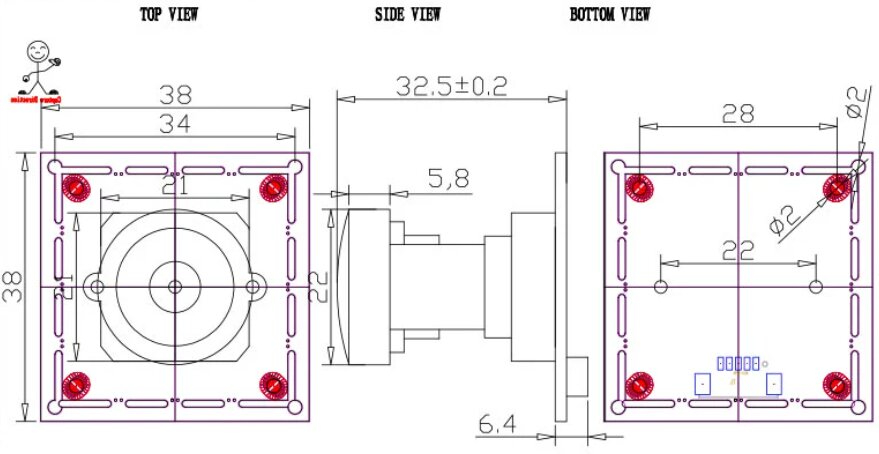
For U.S. and European engineering teams, this version is best understood as a low-friction evaluation camera rather than a high-risk integration project. With UVC-compliant USB 2.0 output, a 38 × 38 mm board, and an M12 lens mount, it gives product managers, robotics engineers, and edge AI developers a faster way to validate image quality, field of view, and host compatibility on Windows, Linux, Jetson, and industrial PC platforms.
✔ A lower-risk 4K UVC path for engineering evaluation
Start image validation on Windows, Linux, or embedded PCs without custom driver work.
✔ Better low-light image quality than many smaller 4K USB cameras
The 1/1.8-inch STARVIS 2 sensor helps preserve usable detail in dim indoor, backlit, and mixed-light environments.
✔ A strong fit for robotics and Physical AI prototyping
Ideal for teams building robot perception, teleoperation vision, AI terminals, and edge visual systems that need practical 4K testing.
✔ Easier lens and FOV adaptation for real projects
The M12 mount allows teams to match lens angle and scene coverage without redesigning the whole camera path.
✔ Designed to shorten the path from sample to decision
This camera is meant for project validation, not just specification comparison.

Who Should Start with the IMX678 USB2.0 Version?
This version is best for teams that need to validate image quality quickly before committing to a final camera architecture.
Typical fit includes:
• U.S. robotics teams evaluating a 4K low-light camera for robot vision, teleoperation, or Physical AI perception
• product managers comparing image quality before choosing between USB2.0, USB3.0, HDMI, or a more deeply embedded solution
• edge AI developers building prototypes on Windows, Linux, Jetson, or x86 industrial PCs
• industrial engineering teams testing a compact 4K USB camera for machine-side visibility, intelligent visual systems, or early-stage industrial imaging
If your goal is the fastest low-friction proof of concept with a strong sensor platform, the IMX678 USB2.0 version is a smart place to start.
Who Should Not Choose the USB2.0 Version First?
Teams should not start with the USB2.0 version if their workflow is already bandwidth-sensitive, analysis-heavy, or dependent on a less constrained image pipeline.
For example, you may want to move directly to an IMX678 USB3.0 or HDMI version if your project depends on:
• OCR or fine-detail image analysis
• higher-throughput computer vision workflows
• display-first 4K output without PC-side UVC processing
• image pipelines where USB2.0 bandwidth becomes the practical bottleneck
In other words, this IMX678 USB2.0 camera is the right choice when fast evaluation, broad host compatibility, and practical UVC deployment matter more than maximum throughput.
Quick Linux and UVC Evaluation
For engineering teams using Ubuntu, Jetson, Raspberry Pi, or x86 Linux systems, the IMX678 USB2.0 camera is intended to be easy to validate through standard UVC and V4L2 workflows.
Typical first-step evaluation path:
1. Confirm camera detection on Linux
Example:
v4l2-ctl --list-devices
2. Check supported video formats and resolutions
Example:
v4l2-ctl -d /dev/video0 --list-formats-ext
3. Run a simple GStreamer preview test
Example:
gst-launch-1.0 v4l2src device=/dev/video0 ! videoconvert ! autovideosink
4. Test image capture in OpenCV or your own application stack
This is a practical way to validate image quality, field of view, exposure behavior, and host compatibility before moving into deeper software integration.
Recommended evaluation priorities:
• low-light image usability
• lens angle and scene coverage
• exposure behavior in mixed lighting
• host-side stability on your target Linux platform
• whether USB2.0 is sufficient for your proof-of-concept stage
If your team already knows the image pipeline is bandwidth-sensitive or analysis-heavy, it may be more efficient to compare this camera with an IMX678 USB3.0 version early in the evaluation process.
Solving Real-World Integration Challenges:
Defeating Motion Ghosting in AMR Navigation: Older multi-frame HDR sensors create "ghosts" on fast-moving objects. The IMX678 utilizes Clear HDR (Dual-Exposure), capturing high-contrast warehouse environments and bright tunnel exits simultaneously without motion artifacts.
The Bandwidth & Compatibility Sweet Spot (USB 2.0): While USB 3.0 offers uncompressed video, it severely limits cable length and increases EMI (Electromagnetic Interference) in compact robots. By utilizing efficient MJPG/YUY2 compression over USB 2.0, this module ensures rock-solid 4K@30fps video streams across legacy industrial PCs, long cable runs, and diverse ARM platforms.
Native ROS & Jetson Ecosystem Support: No proprietary SDKs. The UVC-compliant pipeline guarantees out-of-the-box compatibility with NVIDIA Jetson Orin, Raspberry Pi 5, OpenCV, GStreamer, and ROS/ROS2 nodes.
Transparency is key to a successful engineering partnership. Here are the detailed specifications for our standard module.
|
Category |
Specification |
|
Sensor |
Sony IMX678 (1/1.8") |
|
Max. Resolution |
3840(H) x 2160(V) |
|
Interface |
USB 2.0 High Speed |
|
Output Format |
MJPEG / YUV2 (YUYV) |
|
Frame Rate (MJPEG) |
3840x2160 @ 30fps, 1920x1080 @ 60fps, 1280x720 @ 60fps |
|
Frame Rate (YUV) |
3840x2160 @ 1fps, 1920x1080 @ 5fps, 640x480 @ 30fps |
|
Min. Illumination |
0.5 Lux |
|
Dynamic Range |
72dB |
|
Signal-to-Noise Ratio |
30dB |
|
Focus |
Fixed |
|
Lens |
F2.0 Aperture / 3.05mm Focal Length / 118° D-FOV |
|
OS Support |
Windows, Linux, macOS, Android (UVC Compliant) |
|
Adjustable Controls |
Brightness, Contrast, Saturation, Sharpness, White Balance, Exposure, etc. |
Integration & Compatibility
| Typical use case | Recommended lens direction | Working-distance logic | Why it matters |
|---|---|---|---|
| Robot front view / teleoperation | Wide-angle | Short to medium distance | Prioritizes scene awareness and navigation context |
| Mobile robot indoor perception | Mid FOV | Medium distance | Balances obstacle visibility and subject detail |
| Edge AI terminal / kiosk-side capture | Mid FOV | Fixed short-to-medium distance | Better framing for controlled deployment positions |
| Machine-side observation | Mid to narrow FOV | Fixed distance | Helps evaluate useful detail on equipment and workflows |
| Fine-detail validation | Narrower FOV | Longer distance or smaller ROI | Improves pixel density on the target area |
Lens and Working Distance Selection Guide
The IMX678 USB2.0 camera uses an M12 lens mount, which gives product teams more flexibility to match the camera to the real scene rather than forcing one fixed field of view. Lens choice should always be based on your actual working distance, scene width, target detail level, and installation constraints.
As a practical starting guide:
• Wide-angle setup
Best for mobile robot front view, teleoperation awareness, kiosk-adjacent scenes, and compact indoor environments where broader scene coverage matters more than fine detail.
• Mid-range field of view
Best for robot perception, machine-side visibility, edge AI terminals, and general-purpose industrial evaluation where the team needs a balance between scene coverage and subject detail.
• Narrower field of view
Best for applications that need more detail from a longer distance, including focused observation, tighter scene framing, and early-stage validation of fine-detail tasks.
What we recommend customers send us before choosing a lens:
• target working distance
• approximate scene width or object size
• preferred field of view
• whether the priority is awareness, recognition, or detail
• lighting condition
• mounting position
If you are not sure which lens to start with, tell us your scene dimensions and working distance. We can recommend a more suitable M12 lens direction for your first sample.
FAQ Section for the IMX678 USB2.0 Product Page
1. What kind of project is the Goobuy UCM-678-4K actually best for?
The Goobuy UCM-678-4K is best for teams that need to validate 4K image quality quickly before locking a final camera architecture. It is a strong fit for robotics vision, Physical AI prototypes, edge AI terminals, and compact industrial imaging projects where low-light performance matters, but the team does not want to start with MIPI integration or custom driver work. In practical terms, it is best used as a low-friction UVC evaluation camera for Windows, Linux, Jetson, and industrial PC environments.
2. Is USB2.0 enough, or should we move directly to USB3.0 for a serious project?
USB2.0 is often the right place to start if the immediate goal is image evaluation, platform validation, and fast proof of concept. Many teams move too quickly into a higher-bandwidth architecture before they have even confirmed lighting, lens angle, or image quality. USB3.0 becomes the better choice when the workflow is analysis-heavy, bandwidth-sensitive, or dependent on higher-throughput image pipelines. A good rule is this: start with USB2.0 if you are still validating whether the image works for the project; move to USB3.0 when you already know the image works and now need more throughput headroom.
3. For robotics and Physical AI teams in the U.S., how should we evaluate the Goobuy UCM-678-4K?
A U.S. robotics or Physical AI team should evaluate the Goobuy UCM-678-4K in the same way they would evaluate any serious perception component: under real lighting, real working distance, real field of view, and on the actual host platform intended for development. The most useful sample test is not a lab-perfect image test. It is a deployment-style test on Windows, Linux, Jetson, or an industrial PC using the same scene conditions the final system will face. For mobile robots, teleoperation, and compact intelligent devices, the key questions are whether the image remains usable in mixed lighting, whether the optics fit the scene, and whether the host system can work with the camera without friction.
4. From a product manager’s perspective, what does this camera help us decide faster?
It helps answer the questions that usually delay camera decisions: Is 4K actually useful for this scene? Is low-light performance good enough? Does the lens angle match the use case? Can the software team work with the camera immediately? Does the image justify moving to a higher-complexity final architecture later? For many product managers, the biggest value is not the camera itself. It is the speed at which the team can reduce uncertainty and move from sensor comparison to a real product decision.
5. Is the Goobuy UCM-678-4K intended to be the final production camera, or a validation-stage camera?
In many projects, the Goobuy UCM-678-4K should first be understood as a validation-stage camera that helps engineering and product teams confirm image quality, optics, and platform compatibility with less friction. In some projects, especially compact intelligent devices or practical UVC-based systems, it may also remain a final deployment camera. But its strongest commercial value is as a fast and reliable starting point for teams that need to test 4K low-light imaging before committing to USB3.0, HDMI, autofocus, or a deeper embedded architecture.
Q6: Does this Goobuy UCM-678-4K USB module require custom V4L2 drivers for NVIDIA Jetson?
A: No. This module utilizes a built-in ISP (Image Signal Processor) and outputs via standard USB Video Class (UVC). It is natively recognized by Linux (V4L2) on Jetson Nano, Xavier, and Orin platforms without any kernel recompilation or custom driver deployment.
Q7: Why build a 4K IMX678 module on USB 2.0 instead of USB 3.0 or MIPI CSI-2?
The Engineering Reality: While MIPI CSI-2 offers the lowest latency and USB 3.0 offers uncompressed bandwidth, they introduce severe physical constraints in robotics. USB 3.0 cables are notoriously stiff, limited in length, and notorious for emitting 2.4GHz EMI that jams GPS and Wi-Fi signals on mobile robots. MIPI requires custom kernel drivers that break every time you update your OS.
By utilizing high-efficiency MJPEG/YUY2 compression over a USB 2.0 pipeline, this module allows for flexible, long-reach cable routing through robotic joints, zero EMI interference, and native driverless V4L2 integration on any edge device. It’s the ultimate trade-off for system stability.
Q8, Our AMRs struggle with "ghosting" artifacts when reading barcodes on moving conveyors or transitioning from dark warehouse aisles to sunlit loading docks. How does the IMX678 actually help?
The Engineering Reality: Older HDR sensors use DOL-HDR (Digital Overlap), capturing short and long exposures sequentially. If an object moves between frames, you get motion blur or "ghosting," which destroys OCR and object detection accuracy. The Sony IMX678 utilizes STARVIS 2 Clear HDR, which allows for near-simultaneous readout of the dual exposures. This eliminates motion artifacts on fast-moving targets while maintaining an 83dB dynamic range, ensuring your vision models receive crisp data regardless of harsh mixed lighting.
Q9: Decoding a 4K@30fps MJPEG stream usually spikes CPU load. How do we handle this on Edge AI devices (like NVIDIA Jetson) without starving our inference models?
The Engineering Reality: A common pitfall is relying on software decoding via OpenCV. To bypass CPU throttling, this UVC module allows you to leverage hardware-accelerated decoding. On NVIDIA Jetson Orin/Xavier platforms, engineers can easily route the MJPEG stream directly to the hardware decoder (NVDEC) using standard GStreamer pipelines (e.g., nvv4l2decoder or nvjpegdec). This keeps CPU utilization near baseline, leaving maximum compute overhead for your VIO (Visual Inertial Odometry), SLAM, or YOLOv10 inference workloads.
Tell Us About Your Project Before You Request a Sample/ Sample Lead Time + Project Information We Need
To recommend the right IMX678 camera version for your project, please send us the following details:
• Your application type (robotics, Physical AI, edge AI, industrial imaging, or other)
• Your host platform (Windows PC, Linux device, Jetson, x86 IPC, Android, etc.)
• Your lighting condition (indoor low light, mixed light, backlit, outdoor, controlled light)
• Your expected working distance and target field of view
• Your preferred lens angle or image detail requirement
• Whether your project is evaluation-stage or close to mass production
• Your expected annual volume
• Whether you are comparing USB2.0, USB3.0, HDMI, autofocus, or another camera architecture
With this information, our team can tell you whether this IMX678 USB2.0 camera is the right starting point, or whether another Goobuy camera format would be a better fit.
This IMX678 USB2.0 camera is designed to help engineering and product teams validate 4K low-light image performance quickly before they commit to a final camera architecture.
 office@okgoobuy.com
Follow Me
Address:A615, 6F, Huachuangda Building, No107 Xinghua 1st Road, 43 District, Xinan street, Baoan, shenzhen, China 518101