
USB, AHD and CVBS micro cameras solve different embedded vision problems in space-limited harsh industrial equipment. USB is best when a compact camera must feed digital video into a nearby Linux, Windows, Android, Jetson, Raspberry Pi or edge AI host. AHD is best when operators need local real-time viewing, longer analog-HD cable routing, DVR recording or monitor display without IP network setup. CVBS is best only when the device must keep legacy analog video compatibility, standard-definition output, low power, simple display or FPV-style analog transmission. In mining, conveyors, BESS, substations, heavy industry, energy facilities and environmental monitoring equipment, the correct interface depends on host type, cable distance, exposure level, recording need, image processing requirement and available mechanical space.
USB vs AHD vs CVBS Micro Cameras for Harsh Embedded Vision
USB, AHD and CVBS micro cameras solve different embedded vision problems in space-limited harsh industrial equipment.
A USB micro camera is usually the best choice when the camera must feed digital video into a nearby Linux, Windows, Android, Jetson, Raspberry Pi, industrial PC or edge AI host.
An AHD micro camera is usually the best choice when operators need local real-time viewing, longer analog-HD cable routing, DVR recording or monitor display without IP network setup.
A CVBS micro camera is usually the best choice only when the product must keep legacy analog video compatibility, standard-definition output, low power, simple display or FPV-style analog transmission.
In mining, conveyors, BESS, substations, heavy industry, energy facilities and environmental monitoring equipment, the correct interface is not decided by camera resolution alone. It is decided by host type, cable distance, exposure level, recording need, image processing requirement and available mechanical space.
In ordinary camera projects, buyers often compare resolution, sensor model and price first.
In harsh embedded vision projects, interface choice often matters more.
A camera may fail as a project choice even if its image quality is acceptable.
Common reasons include:
For compact harsh equipment, the interface is part of the system architecture, not a small detail.
Use this quick rule before comparing camera models:
Choose USB when the video must go into software.
Choose AHD when the video must go to a local monitor or DVR.
Choose CVBS when the device must keep legacy analog video and standard definition is acceptable.
This rule is not perfect, but it prevents many wrong selections.
If the system needs OpenCV, AI, edge inference, UVC capture, Linux video pipeline or software recording, start with USB.
If the system needs a real-time monitor, DVR recording, long analog-HD cable route or AHD retrofit, start with AHD.
If the system is old, low-power, analog-only or standard-definition and cannot support HD video, CVBS may still have value.
A USB micro camera outputs digital video through USB. Many industrial and embedded USB cameras support UVC, allowing them to work with common operating systems and video applications.
Typical USB hosts include:
USB is useful when the customer needs camera frames for software.
Typical software workflows include:
A USB micro camera is usually the easiest path when the project already has a nearby host computer.
AHD means Analog High Definition. An AHD micro camera outputs HD analog video to an AHD monitor, AHD DVR, RCA / BNC input or coax-style video system.
AHD is useful when the project needs video display or recording, but not software-side frame processing.
Typical AHD hosts include:
AHD is especially useful when the camera must be placed near the target, while the monitor or DVR is farther away.
The key value is:
small camera near the problem + longer video cable + local display or DVR evidence.
CVBS means Composite Video Baseband Signal. It is an older analog video format, usually standard definition.
CVBS is not suitable for every modern embedded vision project. Its resolution is much lower than USB or AHD.
However, CVBS can still be useful when the device must support:
CVBS should be selected for compatibility, not for image detail.
For modern harsh-site equipment, CVBS is usually a fallback or legacy path, not the first choice.
| Factor | USB Micro Camera | AHD Micro Camera | CVBS Micro Camera |
|---|---|---|---|
| Main role | Digital video input for host software | Local HD video to monitor / DVR | Legacy analog video |
| Best host | Linux, Windows, Android, Jetson, Raspberry Pi, industrial PC | AHD DVR, AHD monitor, RCA / BNC input | CVBS monitor, analog DVR, OSD board, legacy display |
| Image processing | Strong | Needs capture / conversion | Needs capture / conversion and lower detail |
| Local monitor | Needs host or display workflow | Direct to AHD monitor | Direct to CVBS monitor |
| DVR recording | Through host software or recorder | Direct to AHD DVR / monitor DVR | Direct to legacy DVR |
| Cable distance | Best for short controlled cable runs | Better for longer analog-HD cable runs | Good for simple analog routing but low resolution |
| Resolution direction | 1080P, 4K and higher depending on camera | Commonly 1080P and analog-HD formats | Standard definition |
| Power and wiring | Often power + data through USB | Usually video plus power wiring | Usually video plus power wiring |
| Best use | Embedded host device | Local monitor / DVR system | Legacy analog system |
| Weakness | Cable length and host dependency | Less direct for software processing | Low image detail |
The interface should follow the workflow.
Do not choose USB if the site only has a monitor.
Do not choose AHD if the system needs OpenCV frames.
Do not choose CVBS if the task needs high-detail image evidence.

Mining equipment often includes compact cabinets, control panels, local terminals, rugged monitoring boxes and service enclosures.
The best interface depends on the device.
Choose USB when:
Choose AHD when:
Choose CVBS when:
For exposed mining dust, mud or vibration, interface selection is not enough. Housing, cable protection, connector locking and vibration validation must also be addressed.
Conveyor systems are common in mining, cement, steel, recycling, grain, ports and bulk-material handling sites.
Typical visual tasks include:
Choose USB when the conveyor device includes a nearby embedded host, edge AI box or industrial PC that processes video.
Choose AHD when the operator needs a local monitor or DVR replay and the camera is far from the display.
Choose CVBS only when the equipment already uses analog low-resolution video and the visual task does not require high detail.
For conveyor heat risk, visible USB, AHD or CVBS cameras are not enough. Thermal imaging should be evaluated separately for roller, bearing or motor overheating.
BESS monitoring requires careful separation between visible confirmation and thermal / safety detection.
A micro camera may help with:
Choose USB when:
Choose AHD when:
Choose CVBS only for legacy analog service equipment where standard-definition video is acceptable.
Important boundary:
A visible camera does not replace BMS data, fire-safety systems or thermal imaging. If the target is heat abnormality, thermal cameras or temperature sensors are required.
Substations and utility equipment may require camera input in cabinets, inspection terminals, protected utility rooms, service panels and robot docking stations.
Choose USB when:
Choose AHD when:
Choose CVBS only when:
For substation use, interface choice is only one part. The final system must also consider EMI, grounding, surge protection, safety distance, enclosure design and cable routing.
Heavy industrial machines often have tight interiors, inspection windows, service panels and hidden mechanisms.
Typical tasks include:
Choose USB when the camera is inside a smart machine with a nearby host computer.
Choose AHD when the technician needs a local DVR monitor and the camera must be placed near a hidden mechanism.
Choose CVBS when the machine already has a legacy analog display path and the target does not need HD detail.
For extremely tight spaces, camera size may matter more than interface.
A 15×15mm USB or AHD camera may fit many cabinets and machine interiors. A smaller AHD camera core may be needed for narrow cavities.
Energy facilities include pump stations, compressor rooms, solar service equipment, wind service terminals, field cabinets and remote utility shelters.
Choose USB when:
Choose AHD when:
Choose CVBS when:
For hazardous zones, interface choice is not the main question. Certification, enclosure, cable glands, grounding and safety approval must be evaluated first.
Environmental monitoring and wastewater systems often include pump stations, wet cabinets, control panels, remote sensor boxes and maintenance terminals.
Choose USB when:
Choose AHD when:
Choose CVBS when:
Moisture, condensation and corrosion can be more important than interface. The final camera design must consider sealing, lens window contamination, cable exit and maintenance access.
Typical applications include BESS terminals, wastewater pump stations, industrial machine cabinets, conveyors, utility equipment and compact edge monitoring boxes.
Typical applications include mining equipment, remote utility shelters, pump stations, cold-region cabinets and heavy machinery.
Typical applications include machine interiors, factory automation cabinets, conveyors, bulk material handling and maintenance tools.
Typical applications include mining cabinets, tunnel equipment, forestry machines, service tools and Nordic industrial devices.
Typical applications include ports, offshore energy support, wastewater, coastal equipment and utility service terminals.
Typical applications include BESS, solar service cabinets, water infrastructure, tunnels, machine equipment and environmental monitoring.
|
Real Condition |
Better Interface |
|
Camera connects to Linux, Windows, Android or Jetson host |
USB |
|
System needs OpenCV, AI or software capture |
USB |
|
Camera is inside compact edge AI box |
USB |
|
Camera is inside robot gripper or embedded terminal |
USB |
|
Operator needs local monitor display |
AHD |
|
Maintenance team needs DVR recording |
AHD |
|
Long analog-HD cable route is needed |
AHD |
|
Existing system has AHD DVR or monitor |
AHD |
|
Device has legacy CVBS monitor or OSD board |
CVBS |
|
Standard-definition video is acceptable |
CVBS |
|
FPV-style analog transmission is required |
CVBS |
|
Heat detection is required |
Thermal, not visible USB / AHD / CVBS alone |
|
Direct washdown exposure |
IP69K or rugged sealed camera structure |
|
Corrosive or marine-style environment |
Stainless or corrosion-resistant housing |
|
High-speed motion inspection |
Global shutter or machine vision camera |
|
Remote networked monitoring |
IP / PoE, not USB / AHD / CVBS alone |
USB is the best direction when the camera is part of a compact intelligent device.
Typical examples:
Goobuy UC-501 is a 15×15mm 2MP micro USB camera module for space-limited host integration.
Recommended product link:
Goobuy UC-501 15×15mm 2MP Micro USB Camera
Choose this direction when the system needs:
Do not choose USB only because it is familiar. Choose it when the host workflow requires digital camera frames.
AHD is the best direction when the camera must feed a monitor or DVR rather than software.
Typical examples:
Goobuy AC-501 is a 15×15mm Sony IMX323 AHD camera module for DVR, monitor, RCA / BNC and coax-style analog-HD systems.
Recommended product link:
AC-501 IMX323 Micro AHD Camera Module
Choose this direction when the system needs:
AHD is not ideal for direct AI image processing unless the system adds capture hardware or conversion.
Sometimes even a 15×15mm camera is too large.
A 6×6mm AHD camera direction is useful when the camera head must enter a narrow mechanical location, inspection hole, duct, cavity, tool head or protected equipment space.
Typical examples:
Recommended product link:
6×6mm Micro AHD Camera Monitor Kit
Choose this direction when:
Do not choose it for direct exposed outdoor installation without mechanical protection.
If the camera is no longer protected inside a cabinet or device, a micro camera module may not be enough.
For wet, dusty, washdown or outdoor-adjacent positions, an IP69K AHD camera monitor kit may be more realistic.
Typical examples:
Recommended product link:
IP69K AHD Camera Kit for Harsh Industrial Equipment
Choose this direction when:
This is an AHD system selection, not just an image sensor selection.
CVBS should be used carefully.
It is suitable when the system must keep:
Recommended reference link:
Low-Light CVBS / Thermal / STARVIS Camera Architecture Guide
Choose CVBS when compatibility is more important than image detail.
Do not choose CVBS when the system needs:
If the project searched for “0 Lux CVBS camera” because the current camera cannot see in darkness, confirm whether the real requirement is thermal imaging. Starlight CVBS still needs visible or near-visible light. Thermal cameras detect heat.
For edge AI, USB is usually the first choice among these three interfaces.
Reason:
Edge AI systems need digital frames.
AHD and CVBS can be used only after capture or conversion, which adds hardware and may reduce system simplicity.
Choose USB for:
Choose AHD only if the edge device also needs a local analog camera path or the camera is mainly for operator viewing.
Choose CVBS only if the system is legacy analog and AI is not the main function.
For local maintenance, AHD is often the best choice.
Reason:
Maintenance teams often need to see and record what happened, not process the image with AI.
Choose AHD when the workflow is:
camera near fault point → cable to monitor → DVR recording → technician review
This fits:
USB can work if a host is available.
CVBS can work if the system is legacy and standard definition is enough.
But for a clean local DVR workflow, AHD is usually more practical.
Tiny inspection tools require a different decision process.
Ask first:
Choose USB when the tool has a compact host and needs software capture.
Choose AHD when the tool uses a local monitor or DVR.
Choose CVBS when the tool already has legacy analog video and the detail requirement is low.
For extremely small camera heads, mechanical size may override interface preference.
USB is not ideal for simple long-distance camera-to-monitor video. AHD may be easier.
AHD does not directly provide UVC frames. If the system needs OpenCV or AI, USB is usually better.
CVBS is standard definition. It should not be selected for high-detail inspection or evidence.
The host decides the interface. Confirm the host before choosing the camera.
In harsh sites, a small camera module may fail if the enclosure, cable and connector are wrong.
Low-light analog video still needs light. Thermal imaging is required when the target must be detected by heat.
AHD is only a video interface. Ruggedness depends on housing, cable, connector, sealing and mounting.
Before selecting USB, AHD or CVBS, answer these questions:
The correct interface becomes clear when these questions are answered.
USB, AHD and CVBS micro cameras are not interchangeable. They belong to different embedded vision architectures.
USB is the best choice when a compact camera must send digital video into a nearby embedded host, industrial PC, Linux system, Android device, Jetson, Raspberry Pi or edge AI box.
AHD is the best choice when a compact camera must send real-time video to a local monitor or DVR over a longer analog-HD cable path without IP setup or USB host software.
CVBS is the best choice only when the device must keep legacy analog compatibility, low-cost standard-definition video or FPV-style analog transmission.
For compact harsh-site systems in mining, conveyors, BESS, substations, heavy industry, energy facilities and environmental monitoring, the interface should be selected by the real workflow:
software processing → USB
local monitor / DVR evidence → AHD
legacy analog compatibility → CVBS
heat detection → thermal
direct washdown or outdoor exposure → rugged housing or IP-rated camera system
The best micro camera is not the one with the highest specification. It is the one that matches the host, cable, enclosure, lens, environment and maintenance workflow.
If your project needs a micro camera for compact harsh embedded vision, send Goobuy your host device, camera task, cable distance, available space, lighting condition, enclosure design, interface requirement, sample quantity and pilot plan.
Goobuy can help evaluate whether USB, AHD, CVBS, IP69K AHD, thermal, global shutter or another camera architecture is the right starting point.
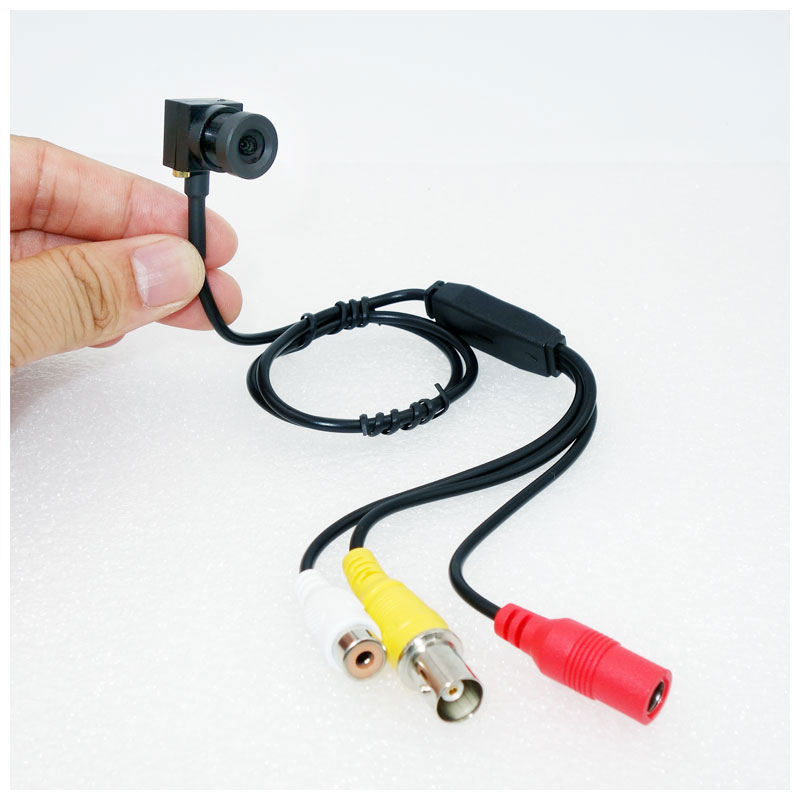
Choose USB if the camera connects to a nearby embedded host or software system. Choose AHD if the camera connects to a local monitor or DVR. Choose CVBS only if the product must keep legacy analog video compatibility and standard-definition image quality is acceptable.
Yes, USB is usually better for edge AI because it provides digital video frames to Linux, Windows, Android, Jetson, Raspberry Pi or industrial PC hosts. AHD normally needs capture hardware before software can process the image.
Often yes. AHD is usually better when technicians need a camera near the fault point, a longer cable to a local monitor, and DVR recording without a PC, IP setup or USB software.
CVBS should be used when the device already depends on a legacy analog monitor, CVBS DVR board, OSD system, FPV-style analog link or low-cost standard-definition video path. It should not be selected when HD detail or AI image processing is required.
No. Low-light CVBS still needs visible or near-visible light. If the project must detect people, animals, overheated equipment, fire risk, BESS thermal abnormality or no-light heat signatures, thermal imaging should be evaluated.
If the box has an embedded host and needs image processing, choose USB. If it needs local display and DVR recording, choose AHD. If it is a legacy analog system and only needs standard-definition viewing, CVBS may be acceptable. For heat-risk detection, add thermal imaging.
USB is suitable inside embedded monitoring terminals and edge gateways. AHD is suitable for local maintenance monitor or DVR systems. CVBS is suitable only for legacy analog equipment. For thermal risk, use thermal cameras or temperature sensors.
Please send the application, industry, host device, required workflow, cable distance, available camera space, field of view, lighting condition, whether the camera is protected or exposed, environmental risks, recording need, sample quantity and pilot plan.
2MP 15×15mm USB camera modules UC-501 www.okgoobuy.com/2mp-mini-usb-camera.html
0.001Lux CVBS micro camera modules CC-001 www.okgoobuy.com/0lux-CVBS-camera-module.html
this article is updated by Mr Art huang from shenzhen novel electronics limited in July 19th, 2026
Follow Me
Address:A615, 6F, Huachuangda Building, No107 Xinghua 1st Road, 43 District, Xinan street, Baoan, shenzhen, China 518101