
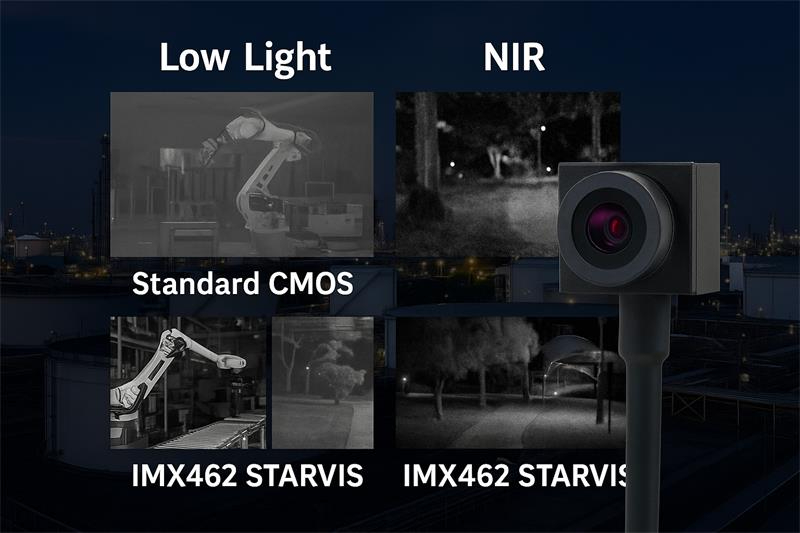
STARVIS 2 + AI embedded vision refers to camera systems that combine Sony STARVIS 2 low-light image sensors with edge AI software running on a host device, industrial PC, AI box, embedded Linux board, Android terminal, robot controller, or inspection system. STARVIS 2 sensors are designed for security and low-light imaging applications, with strong near-infrared sensitivity and improved performance in dark or high-contrast scenes. Sony describes STARVIS as enabling clear images in near-infrared light environments, and its security sensor lineup includes STARVIS, STARVIS 2, and STARVIS 3 technologies for scenes with both dark and bright conditions.
For OEMs and system integrators, STARVIS 2 does not replace AI software. It improves the image input quality so the AI model, detection algorithm, or human operator can work with clearer visual data under difficult lighting. Goobuy provides STARVIS 2 USB camera module platforms such as IMX678 and IMX585 for projects that need fast sample testing, UVC host compatibility, low-light vision, HDR scene handling, and project-based customization.
AI vision systems are only as good as the images they receive.
In many real-world embedded vision projects, the problem is not that the AI model is weak. The problem is that the camera image becomes unreliable when lighting changes.
This happens in many European and North American applications:
This is where Sony STARVIS 2 sensors can support AI embedded vision.
STARVIS 2 is not an AI algorithm. It is image sensor technology. Its value is that it can provide better low-light and high-dynamic-range visual input before the AI model starts processing the image.
For OEMs and system integrators, the practical question is not:
“Is STARVIS 2 an AI camera?”
The better question is:
“Can a STARVIS 2 USB camera module give our host device better visual input for detection, monitoring, inspection, or recognition under difficult lighting?”
For many projects, the answer is yes — especially when the customer already has an AI host, Android terminal, industrial PC, embedded Linux platform, NVIDIA Jetson system, kiosk controller, or edge computing device and needs a camera module that can be tested quickly.
STARVIS 2 is most valuable when the application has one or more of these lighting problems.
Many AI cameras fail when the scene becomes too dark. The image may become noisy, blurred, underexposed, or colorless. This affects both human viewing and AI model accuracy.
A STARVIS 2 camera can help when the system needs usable visual information in:
Sony’s own STARVIS technology material emphasizes clear imaging in near-infrared environments and notes that high NIR sensitivity can reduce the required amount of NIR illumination, helping reduce heat generation and power consumption from IR light sources.
Many AI systems struggle when bright and dark areas appear in the same frame.
Examples:
STARVIS 2 sensors are relevant because Sony’s security sensor product line positions STARVIS / STARVIS 2 / STARVIS 3 for handling scenes with both dark and bright conditions.
Some embedded vision systems use 850nm or 940nm IR illumination for low-light operation. STARVIS sensors are designed for low-light security and near-infrared imaging use cases.
This matters for:
AI models often fail when the camera feed has:
A STARVIS 2 camera does not solve every AI problem, but it can provide cleaner visual input for:
In a real embedded vision system, the camera is only one part of the chain.
A typical system may look like this:
STARVIS 2 USB Camera Module → Host Device / Edge AI Box → AI Model or Vision Software → Alert / Recording / Decision / User Interface
The camera captures the image.
The host device runs the application.
The AI model or software processes the video.
The final system decides what to do with the result.
For Goobuy customers, the host device may be:
This is why USB camera modules can be attractive. A UVC USB camera can often be tested faster than a deeply customized MIPI camera, especially when the buyer already has a host device and does not want to redesign the main PCB.

Many AI vision discussions focus on sensors, algorithms, and large model capability. But OEM buyers often have a more practical problem:
They already have the host device. They need the right camera module to finish the product.
A USB STARVIS 2 camera module can help when the buyer needs:
This is different from building a full camera system from zero.
For many U.S. and European OEMs, the fastest path is:
Existing host device + STARVIS 2 USB camera sample + real scene testing + lens/cable/housing customization + batch order
Goobuy’s STARVIS 2 IMX678 USB camera platform is suitable for projects that need 4K detail, low-light performance, and better handling of mixed lighting.
The IMX678 is commonly discussed as a STARVIS 2 4K sensor. Sony’s official IMX678 flyer describes STARVIS 2 as back-illuminated pixel technology for security camera CMOS image sensors and states sensitivity of 2000 mV or more, with STARVIS 2 improving sensitivity and dynamic-range performance for security camera applications.
IMX678 is useful when the AI system needs:
IMX678 USB may not be the best choice if the project needs:
Goobuy provides the camera hardware platform. The customer’s host system and AI software decide how the image is processed.
Goobuy’s STARVIS 2 IMX585 USB camera platform is suitable for projects that prioritize stronger low-light sensitivity and larger sensor imaging.
IMX585 is an 8.29MP 4K STARVIS 2 sensor. Third-party sensor listings describe the IMX585 as a 1/1.2-inch optical format sensor with 3840 × 2160 pixels and 2.9µm pixel size, designed for security camera systems.
IMX585 is especially useful when the AI or monitoring system needs:
IMX585 USB may not be the best choice when the product needs:
| Factor | STARVIS 2 IMX678 USB | STARVIS 2 IMX585 USB |
|---|---|---|
| Main Strength | 4K detail + HDR-friendly embedded vision | Larger sensor + stronger low-light foundation |
| Typical Optical Format | 1/1.8-inch class | 1/1.2-inch class |
| Pixel Size | Smaller than IMX585 | Larger 2.9µm pixel class |
| Best For | Mixed lighting, smart devices, kiosks, embedded AI, industrial monitoring | Higher-end night monitoring, large scene visibility, premium low-light systems |
| Module Size | Easier to fit into more compact designs | Requires larger optics and more space |
| AI Value | Better visual detail and dynamic lighting handling | Better low-light scene input |
| Buyer Profile | OEMs needing a balanced 4K STARVIS 2 USB camera | OEMs prioritizing stronger night image quality |
| Goobuy Position | Platform-friendly USB camera for many embedded vision projects | High-value low-light USB camera option for premium systems |
Choose IMX678 USB if the project needs a balanced 4K STARVIS 2 camera for edge AI, smart kiosks, industrial monitoring, mixed lighting, or embedded host devices.
Choose IMX585 USB if the project needs stronger low-light imaging, larger sensor performance, higher-end night monitoring, or premium visual quality.
Choose a global shutter USB camera instead if the main problem is motion blur, high-speed movement, barcode reading, fast object capture, or synchronized inspection.
Many U.S. and European smart kiosks, self-service terminals, payment terminals, access devices, and service counters use Android or embedded Linux hosts.
These systems often need a camera for:
A STARVIS 2 USB camera can be useful when the built-in camera position is not ideal, or when the kiosk requires an external camera head with a specific lens, cable, housing, or angle.
Kiosks often face difficult lighting:
IMX678 USB is often a good starting point when the project needs 4K image detail and better handling of mixed lighting.
Digital signage and retail media systems increasingly use AI players or edge boxes for audience analytics, content interaction, and environmental sensing.
A STARVIS 2 USB camera can be used as an external vision input for:
Many signage players already have USB ports and run Android, Linux, or Windows-based software. A USB camera can often be tested faster than redesigning the player hardware.
Goobuy can support external USB camera modules with custom cable, lens, mounting, housing, and camera descriptor customization for display-player projects.
Industrial monitoring does not always need precision machine vision. Many projects need reliable visual confirmation.
Examples include:
A STARVIS 2 USB camera can support an industrial PC, rugged tablet, edge device, or embedded host that needs a better low-light video input.
Use IMX678 USB when the scene includes mixed lighting, small details, indicator LEDs, reflective surfaces, and 4K monitoring needs.
Use IMX585 USB when the priority is larger-scene low-light visibility, premium night monitoring, or stronger sensitivity in darker environments.
Many inspection devices now combine camera input with AI or rule-based software.
These devices may inspect:
A STARVIS 2 USB camera can help when lighting cannot be controlled perfectly.
STARVIS 2 is not a replacement for global shutter. If the target is moving quickly and motion blur is the main problem, a global shutter USB camera may be more appropriate.
STARVIS 2 is stronger when the main challenge is:
Robots and mobile inspection devices often move through lighting transitions.
Examples:
A STARVIS 2 USB camera can provide visual input for AI perception, remote viewing, inspection recording, or human operator review.
Use USB STARVIS 2 when:
MIPI may be better if:
STARVIS 2 sensors are widely associated with security camera applications. Sony’s own product category places STARVIS and STARVIS 2 inside its security camera image sensor lineup.
For Goobuy customers, the better positioning is not consumer security camera resale. It is OEM and industrial integration.
Possible applications include:
A STARVIS 2 USB camera is not a complete security system by itself. It does not replace VMS, NVR, access-control software, AI detection models, privacy policy, or local surveillance compliance requirements.
Goobuy provides the camera module. The customer integrates it into the final system.
Some high-end systems combine visible low-light cameras with thermal cameras.
Thermal cameras help detect heat patterns.
STARVIS 2 cameras help provide visual confirmation.
This can be useful for:
Goobuy can support both STARVIS USB camera modules and thermal imaging camera modules for customers building their own dual-sensor devices or inspection systems.
But the customer usually provides the sensor fusion software, host platform, enclosure, and final application logic.
Goobuy STARVIS 2 USB camera modules are a good fit when the project needs:
This solution may not be the best fit if the project requires:
Goobuy is best suited for OEMs and system integrators who already have a host device or product platform and need a reliable USB camera module to complete the system.
Some customers ask whether they should choose USB or MIPI for STARVIS 2.
| Requirement | STARVIS 2 USB Camera | STARVIS 2 MIPI Camera |
|---|---|---|
| Best For | Existing host devices, fast testing, external or semi-embedded camera heads | PCB-level embedded products, short FPC, high-volume design |
| Development Speed | Usually faster | Usually slower unless platform support already exists |
| Driver Risk | Lower with UVC path | Higher; needs driver/device tree/ISP tuning |
| Camera Placement | More flexible with cable and housing options | Usually close to SoC |
| Host Examples | PC, Android box, Linux host, edge AI box, Jetson, industrial terminal | Custom SoC board |
| Best Stage | Prototype, pilot, sample validation, small-to-medium OEM production | Mature product architecture, high-volume production |
| Goobuy Focus | Strong focus | Not main focus |
Use STARVIS 2 USB when your team needs to test quickly with an existing host.
Use STARVIS 2 MIPI when your product is being designed from the PCB level and your engineering team controls the camera driver, ISP pipeline, and production architecture.
Before requesting a sample, please send:
This helps Goobuy recommend whether IMX678 USB, IMX585 USB, another STARVIS USB camera, a global shutter USB camera, or a thermal camera module is the better fit.
Goobuy specializes in compact USB camera modules for OEM and industrial applications.
For STARVIS 2 projects, the key advantage is not only sensor performance. The advantage is that customers can start from an existing USB camera platform instead of developing the entire camera from zero.
Goobuy can support project-based options such as:
For European and North American OEMs, this can reduce early development risk.
Instead of spending months deciding whether a sensor works in the real environment, the customer can test a Goobuy STARVIS 2 USB sample on the real host, in the real lighting, with the real software workflow.
STARVIS 2 + AI embedded vision is not only a future trend. It is already a practical engineering choice for OEMs and system integrators building devices that must see better in low light, mixed lighting, and NIR-assisted environments.
For Europe and North America, the strongest applications are not vague “AI camera future” concepts. They are specific projects such as:
Choose IMX678 USB when you need a balanced 4K STARVIS 2 camera for embedded AI, mixed lighting, HDR scenes, smart devices, and industrial monitoring.
Choose IMX585 USB when you need stronger low-light performance, larger sensor imaging, premium night monitoring, or higher-value visual confirmation.
Choose global shutter USB when motion blur and fast movement are the real problem.
Choose thermal imaging when temperature difference, heat anomaly, or non-visible thermal information is required.
If your project already has a host device and needs a STARVIS 2 USB camera module for fast testing, Goobuy can provide existing IMX678 and IMX585 USB platforms to help reduce development time and support project-based customization.
No. STARVIS 2 is image sensor technology, not an AI algorithm. It helps provide better low-light, HDR, and NIR-supported image input. The AI model usually runs on the customer’s host device, edge AI box, industrial PC, Android terminal, or embedded platform.
AI vision needs stable image quality. STARVIS 2 can help when the scene has low light, high contrast, backlight, glare, shadows, night operation, or NIR illumination. Better image input can make AI detection, recognition, monitoring, or human review more reliable.
Choose IMX678 USB when you need a balanced 4K STARVIS 2 camera for smart kiosks, edge AI devices, industrial monitoring, mixed-light environments, embedded vision systems, and applications where 4K detail and HDR-friendly imaging are important.
Choose IMX585 USB when the project needs stronger low-light performance, larger sensor imaging, premium night monitoring, or large-scene visual confirmation. IMX585 is more suitable when image quality matters more than minimum module size.
No. STARVIS 2 captures visible and near-infrared image information. Thermal imaging detects heat patterns. For some systems, STARVIS 2 and thermal cameras can be combined, but they solve different sensing problems.
No. STARVIS 2 is strong for low-light and HDR scenes, but it does not automatically solve motion blur. If the main problem is fast object motion, barcode reading, trigger-based inspection, or rolling-shutter distortion, a global shutter USB camera may be more suitable.
Goobuy mainly provides camera module hardware and project-based customization. The customer usually provides the AI model, host platform, application software, cloud system, or final product workflow.
Many USB camera projects can be tested with Android, Linux, Windows, industrial PCs, and edge AI hosts, depending on UVC compatibility, driver support, camera format, power, cable, and application software. Final compatibility should be tested with the exact host device.
USB is often better for fast sample testing and existing host devices. MIPI is often better for high-volume PCB-level embedded products with short internal FPC cables and strong driver/ISP engineering support.
Please send your host device, operating system, target application, lighting condition, required resolution, frame rate, FOV, lens preference, cable length, mounting method, USB interface, video format, and expected sample and batch quantity.
Note: This Article is updated in May 20th, 2026 by Shenzhen Novel Electronics limited
Follow Me
Address:A615, 6F, Huachuangda Building, No107 Xinghua 1st Road, 43 District, Xinan street, Baoan, shenzhen, China 518101