
An IMX291 vs IMX335 vs IMX415 STARVIS USB camera comparison helps OEM engineers choose between 1080P low-light visibility, 5MP mixed-light detail, and 4K visual evidence capture by matching sensor behavior, USB/HDMI interface, lens/FOV, host compatibility, lighting condition, mechanical fit, and customization readiness..
Need a STARVIS camera that standard modules cannot solve? Read our custom STARVIS2 / STARVIS3 USB camera development guide for funded OEM projects with host, timeline, and NRE readiness. read this blog articles Custom STARVIS USB Cameras: Complete Project Guide(1)
An IMX291 vs IMX335 vs IMX415 STARVIS USB camera comparison should not stop at sensor specifications.
For an OEM engineer, product manager, equipment builder, system integrator, or embedded-device manufacturer, the real question is not simply:
“Which Sony STARVIS sensor is better?”
The more useful question is:
“Which STARVIS USB camera module can solve our real imaging problem on our host device, with the right resolution, lens, FOV, interface, cable, housing, and sample-validation path?”
IMX291, IMX335, and IMX415 are all widely used Sony STARVIS-generation sensors, but they serve different project needs. IMX291 is mainly a mature 1080P low-light workhorse. IMX335 is a 5MP balance between detail and low-light usability. IMX415 is a compact 4K STARVIS sensor for projects that need more visual detail, evidence capture, or higher-resolution monitoring.
Sony describes STARVIS, STARVIS 2, and STARVIS 3 as back-illuminated pixel technologies developed for security-camera image sensors, designed to deliver high image quality in visible and near-infrared light regions. But in a real OEM USB camera project, the sensor is only one part of the final result.
The final camera performance depends on:
That is why this page upgrades the old sensor comparison into a sensor + camera platform decision guide.
Quick Answer: Which Camera Should You Evaluate First?
| Real Project Need | Better Starting Point | Why |
|---|---|---|
| Dark enclosure, cabinet, chamber, equipment-panel viewing | IMX291 USB camera | 1080P low-light visibility with lower bandwidth and mature integration |
| Smart cabinet, test chamber, 3D printer housing, machine status viewing | IMX291 low-light UVC camera | Useful when the goal is scene visibility, not high-resolution recognition |
| Retail terminal, access kiosk, parking terminal, visitor device | IMX335 USB3.0 camera | 5MP detail, HDR/mixed-light usability, UVC integration, M12 lens flexibility |
| 4K industrial monitoring or visual evidence capture | IMX415 USB+HDMI camera | 4K STARVIS detail with practical USB/HDMI output |
| Better current-generation 4K low-light performance | IMX678 STARVIS 2 camera | Stronger upgrade path when IMX415 is not enough |
| Larger-sensor premium low-light platform | IMX585 STARVIS 2 camera | Better for high-end low-light monitoring or public-safety-style devices |
| Lens/FOV/cable/housing/interface cannot fit standard module | Custom STARVIS USB Camera Project | Best for funded OEM projects with host, timeline, batch forecast and NRE readiness |
In 2026, many buyers are now talking about IMX678, IMX585, IMX675, and even STARVIS 3 IMX908. But IMX291, IMX335, and IMX415 still matter because they remain practical, mature, and commercially understandable camera platforms.
Not every buyer needs the newest STARVIS 2 or STARVIS 3 sensor.
Some customers simply need:
This is where IMX291, IMX335, and IMX415 still have commercial value.
The old way to compare them was:
IMX291 = best low light
IMX335 = balanced 5MP
IMX415 = 4K detail
That is partly true, but incomplete. A professional buyer also needs to know which camera module fits the host, lens, lighting, mechanical space, and deployment schedule.
The simplest way to understand these three sensors is this:
| Sensor | Practical Role | Best Buyer Question |
|---|---|---|
| IMX291 | 1080P low-light visibility | “Can we see inside a dark device or enclosure reliably?” |
| IMX335 | 5MP mixed-light detail | “Can we capture more usable detail in a terminal, kiosk, parking, or access device?” |
| IMX415 | 4K visual evidence |
“Can we capture 4K detail for monitoring, inspection, or review?” |
This distinction matters because many customers choose the wrong camera by looking only at resolution.
A 4K sensor is not always better. If the host cannot process 4K, or the scene is very dark, a mature 1080P low-light camera may be more reliable.
A 1080P sensor is not always enough. If the device needs item recognition, ID review, license-plate-style review, visual evidence, or digital zoom, 5MP or 4K may be necessary.
The correct choice depends on the project.
IMX291 remains useful when the buyer needs low-light visibility with lower bandwidth and mature integration. Goobuy’s IMX291 product page positions UC-532 as a 1080P low-light UVC camera module for OEM devices that need clear scene visibility inside dark enclosures, smart cabinets, test chambers, 3D printer housings, or equipment panels without building a full IP camera system.
This is the most important repositioning point:
IMX291 should not be sold as a generic “best night vision camera” for every market. It should be sold as a practical low-light visibility camera for equipment and embedded-device monitoring.
IMX291 can be useful when the customer’s real need is:
Avoid IMX291 when:
IMX291 Low-Light STARVIS USB Camera for OEM Equipment
IMX335 is not simply “the middle option.” It can be the best commercial choice when 1080P is not enough but 4K is too heavy or unnecessary.
Goobuy’s IMX335 page positions the product as a 5MP Sony STARVIS USB3.0 UVC camera for self-checkout loss prevention, parking terminals, access-control kiosks, and commercial terminal applications that need low-light detail, HDR performance, UVC compatibility, M12 lens support, and OEM flexibility.
This is a strong 2026 positioning because many commercial devices do not need “the newest sensor.” They need:
IMX335 is often a better fit than IMX291 when the buyer says:
Avoid IMX335 when:
IMX335 USB3.0 HDR Camera for Retail, Parking and Access Terminals
IMX415 is the best choice among these three when the project needs compact 4K image detail. Sony’s 2019 announcement described IMX415 as a type 1/2.8 4K-resolution stacked CMOS image sensor designed for growing security-camera needs, including smart city, traffic monitoring, anti-theft, disaster alert, and commercial monitoring applications. Sony also described the IMX415 as using a 1.45 μm pixel and proprietary high-sensitivity, low-noise technology.
Goobuy’s IMX415 page positions the product as a Sony STARVIS IMX415 4K camera module for night vision and industrial use, with USB and HDMI camera-module relevance.
The best commercial message is:
IMX415 is not the “best low-light” option among all sensors. It is the practical 4K STARVIS choice when visual detail matters more than maximum low-light sensitivity.
IMX415 can be the correct choice when the customer says:
Avoid IMX415 when:
IMX415 4K STARVIS USB+HDMI Camera Module
6. Side-by-Side Decision Table for OEM Customers
Side-by-Side Comparison of Sony STARVIS Sensors
The table below summarizes the core technical specifications of the IMX291, IMX335, and IMX415 sensors.
|
Parameter |
IMX291 |
IMX335 |
IMX415 |
|
Sensor Type |
1/2.8" STARVIS CMOS |
1/2.8" STARVIS CMOS |
1/2.8" STARVIS CMOS |
|
Resolution |
2.13 MP (1920×1080) |
5 MP (2592×1944) |
8.3 MP (3840×2160, 4K) |
|
Pixel Size |
2.9 µm × 2.9 µm |
2.0 µm × 2.0 µm |
1.45 µm × 1.45 µm |
|
Minimum Illumination |
0.005 lux (F1.2) |
0.1 lux (F1.2) |
0.09 lux (F1.6) |
|
Dynamic Range |
~120 dB (with WDR) |
~72 dB |
~72 dB |
|
Frame Rate |
1080p @ 60 fps |
5MP @ 30 fps |
4K @ 30 fps |
|
Interface Options |
USB2.0/3.0, AHD, CVBS |
USB3.0, HDMI, AHD |
USB3.0, HDMI |
|
Typical Application |
Extreme low-light starlight cameras |
Balanced resolution vs sensitivity |
High-resolution 4K surveillance |
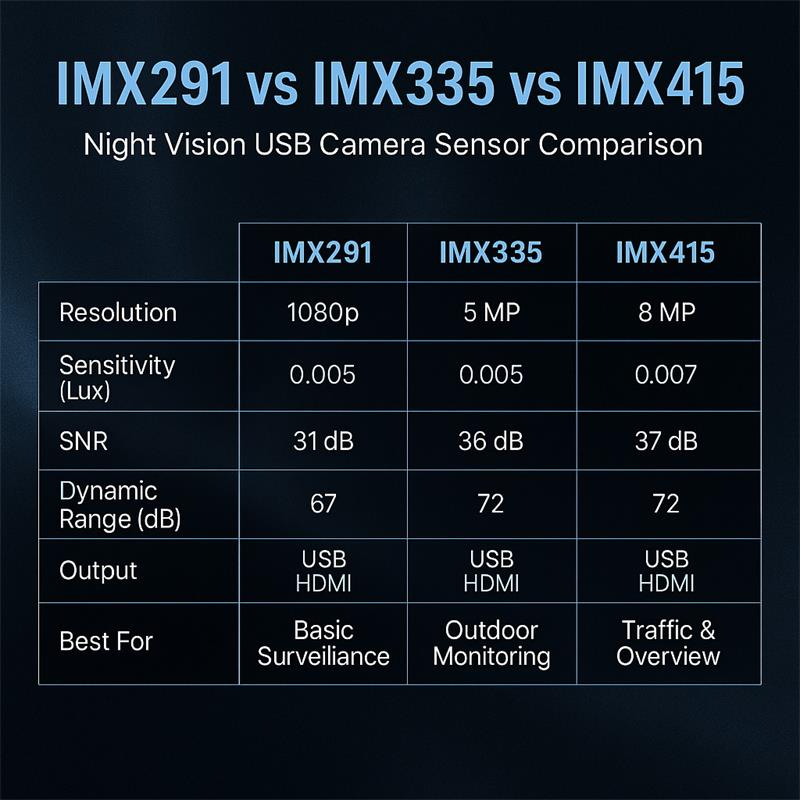
| Decision Factor | IMX291 | IMX335 | IMX415 |
|---|---|---|---|
| Practical role | 1080P low-light visibility | 5MP mixed-light detail | 4K visual evidence |
| Best use | Dark equipment / enclosure viewing | Terminals, kiosks, parking, access control | Industrial monitoring, 4K review, security |
| Resolution logic | Enough for scene visibility | Better detail without full 4K burden | Best detail among the three |
| Host burden | Lower | Medium | Higher |
| Interface direction | USB UVC / low-bandwidth workflows | USB3.0 UVC | USB / HDMI |
| Best buyer | Device OEM needing simple low-light viewing | Commercial terminal OEM | Monitoring / inspection product team |
| Main limitation | Limited detail | Not true 4K | Smaller pixels and heavier 4K data |
| Upgrade path | IMX462 / IMX662 / IMX678 | IMX675 / IMX678 | IMX678 / IMX585 |
| Custom path | Lens/cable/housing tuning | Lens/FOV/bezel/housing tuning | Interface/lens/HDR/display tuning |
For many 2026 projects, yes — but not always.
IMX678 is a stronger current-generation 4K STARVIS 2 direction when the buyer needs better low-light image quality, stronger 4K detail, edge AI image input, robotics vision, inspection, or more modern camera-platform options. Goobuy’s IMX678 deep-dive page positions IMX678 as a STARVIS 2 platform for 4K high-sensitivity imaging, low-noise performance, robotics, AI edge systems, industrial inspection, and challenging lighting environments.
IMX678 4K STARVIS 2 USB Camera Module
IMX678 USB3.0 Camera for 4K Edge AI Image Analysis
IMX678 HDMI Camera Module for Driverless 4K Live View
IMX585 and IMX908 should be mentioned, but not over-promoted inside this page.
IMX585 is a better fit when the customer needs a premium larger-sensor low-light foundation and can accept higher cost, larger optics, or a more advanced camera configuration.
Use IMX585 when the buyer says:
IMX908 should be described as a future-facing STARVIS 3 direction, not as an immediate standard USB replacement for IMX291, IMX335, or IMX415.
Sony announced IMX908 in March 2026 as a STARVIS 3 4K security-camera sensor using 1.45 μm LOFIC pixels and supporting up to 96 dB HDR. Its importance is future compact HDR and difficult mixed-light imaging, but it still requires a mature module ecosystem, ISP tuning, bridge-chip planning, firmware, lens matching, and production validation before becoming a simple catalog USB camera option.
Recommended internal anchors:
IMX585 STARVIS 2 Low-Light USB Camera Module
Sony IMX908 STARVIS 3 USB Camera Development Guide
Choose IMX291 when your product needs a low-light UVC camera to see inside a machine, cabinet, chamber, 3D printer housing, or equipment panel.
The customer in this segment usually does not need 4K. They need clear enough visibility, stable USB integration, compact structure, and a module that can be adapted to their internal mounting position.
Best internal link:
IMX291 Low-Light USB Camera for OEM Equipment
Choose IMX335 when your product needs more detail than 1080P, but 4K is unnecessary or too heavy.
This is especially relevant for self-checkout loss prevention, item-recognition terminals, parking kiosks, gate-entry systems, visitor management, and access-control devices. Goobuy’s IMX335 page already frames this camera for retail terminals, parking systems, and access kiosks with HDR, UVC simplicity, and flexible lens options.
Best internal link:
IMX335 USB3.0 HDR Camera for Retail and Access Terminals
Choose IMX415 when the customer needs 4K detail, visual evidence, USB/HDMI output, or high-resolution monitoring in scenes where the lighting is not extremely poor.
This is a practical fit for monitoring stations, industrial review systems, warehouse visual evidence, port equipment, transportation monitoring, and operator-view applications.
Best internal link:
IMX415 4K STARVIS USB+HDMI Camera Module
If the buyer is using this comparison but actually needs a more modern camera for edge AI, robotics, Physical AI data capture, or 4K low-light analysis, guide them toward IMX678 or IMX585 instead of forcing IMX291 / IMX335 / IMX415 to solve the wrong problem.
Best internal links:
IMX678 4K STARVIS 2 Camera for Edge AI Vision
IMX585 STARVIS 2 Low-Light USB Camera Module
Custom STARVIS USB Cameras: Complete Project Guide
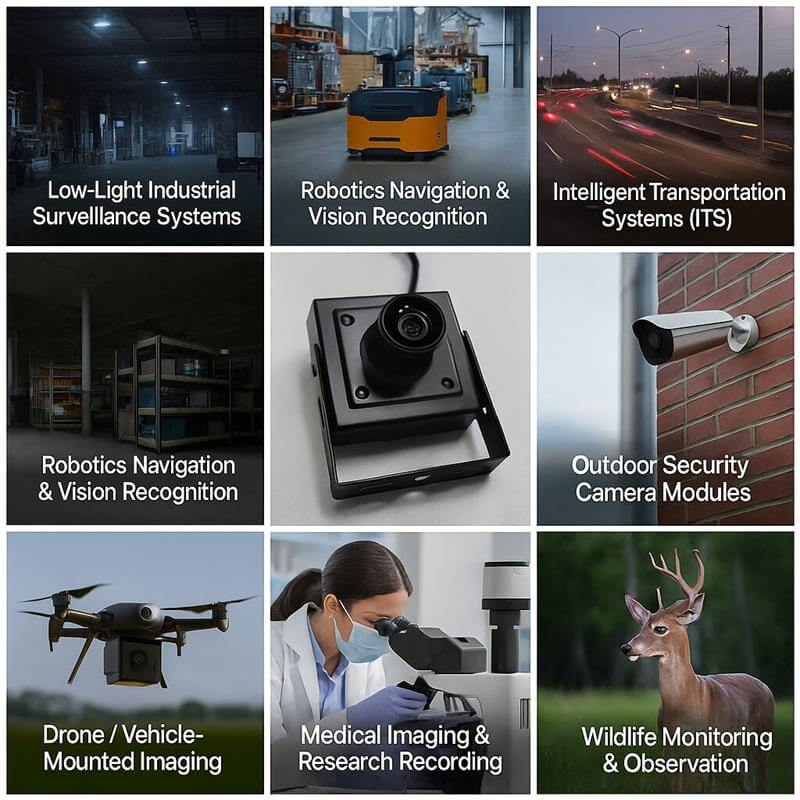
A standard IMX291, IMX335, or IMX415 module is usually the fastest first step. But a custom STARVIS USB camera project becomes relevant when the buyer already has a real device and needs changes such as:
Goobuy’s Custom STARVIS page clearly states that if a project only needs a standard USB camera sample, the buyer should choose an existing camera module first; if the project requires a new board layout, new interface path, lens structure, housing, firmware descriptor, ISP tuning, or special optical/mechanical design, paid NRE may be required after feasibility review.
This is exactly the CTA this blog should use.
Recommended internal anchor:
Custom STARVIS USB Cameras: Complete Project Guide
Before choosing IMX291, IMX335, IMX415, IMX678, or a custom STARVIS camera, send Goobuy the following information:
| Information Needed | Why It Matters |
|---|---|
| Target application | Determines whether the camera is for enclosure viewing, terminal imaging, monitoring, inspection, or AI vision |
| Host device | Determines USB2.0, USB3.0, HDMI, UVC, H.264, Windows, Linux, Jetson, or x86 IPC fit |
| Required resolution | Helps choose 1080P, 5MP, or 4K |
| Lighting condition | Determines whether IMX291, IMX335, IMX415, IMX678, or IMX585 is more realistic |
| Working distance | Controls lens focal length and focus range |
| Required FOV | Prevents wrong lens selection |
| Motion speed | Helps decide whether STARVIS is enough or global shutter is needed |
| Mechanical space | Determines board size, lens height, housing and cable direction |
| Cable and connector | Prevents late-stage integration failure |
| Indoor or outdoor use | Affects housing, sealing, lens and filter strategy |
| Sample timeline | Separates immediate sample needs from custom development |
| Batch forecast | Determines whether customization or NRE is commercially reasonable |
Goobuy IMX291, IMX335, and IMX415 STARVIS USB camera modules are not the best fit if:
The best-fit customer already has a product, host device, or integration project and needs a camera module to solve a defined imaging problem.
Do not choose between IMX291, IMX335, and IMX415 only by asking which sensor is “best.”
Ask instead:
Which STARVIS USB camera platform best matches our resolution need, lighting condition, host device, lens/FOV, mechanical space, interface, sample timeline, and customization path?
Choose IMX291 when your project needs mature 1080P low-light visibility inside equipment, cabinets, chambers, housings, or embedded devices.
Choose IMX335 when your project needs 5MP mixed-light detail for retail terminals, parking kiosks, access-control devices, visitor systems, or commercial embedded vision products.
Choose IMX415 when your project needs 4K STARVIS detail for monitoring, inspection, evidence capture, or USB/HDMI visual systems.
Choose IMX678 or IMX585 when your project needs a stronger current-generation STARVIS 2 low-light platform.
Choose Custom STARVIS USB Camera development when a standard module cannot meet your lens, FOV, cable, housing, interface, firmware, or lighting requirements.
To get a faster recommendation, send your host device, lighting condition, required resolution, working distance, FOV, mechanical space, sample timeline, and expected batch quantity.
Professional FAQ
IMX291 is best for 1080P low-light visibility, IMX335 is best for 5MP mixed-light detail, and IMX415 is best for compact 4K STARVIS visual evidence. The right choice depends on host bandwidth, lighting, lens/FOV, resolution need, mechanical fit, and sample-validation requirements.
Yes. IMX291 is still useful when an OEM device needs 1080P low-light scene visibility with lower bandwidth and mature USB integration. It is especially practical for dark enclosures, smart cabinets, test chambers, machine interiors, and equipment-panel monitoring.
Choose IMX335 when 1080P is not enough and your product needs more detail for a terminal, kiosk, parking system, access-control device, visitor system, or commercial embedded vision product. IMX335 gives a practical 5MP USB3.0 path without the full burden of 4K.
Choose IMX415 when your project needs 4K visual detail, digital zoom, evidence capture, or high-resolution monitoring. Choose IMX335 when 5MP is enough and the project values easier terminal integration, USB3.0 workflow, and mixed-light usability.
IMX415 is better for 4K detail, but IMX291 can be better for simple 1080P low-light visibility when bandwidth, host processing, and scene brightness are limited. For true night-vision camera selection, lens aperture, exposure, IR strategy, ISP tuning, and host performance also matter.
Upgrade from IMX415 to IMX678 when your project needs a stronger 4K STARVIS 2 foundation, better current-generation low-light performance, or more flexible 4K USB/HDMI/autofocus/CS-lens platform options. Stay with IMX415 when mature 4K STARVIS cost-performance is enough.
IMX291 is often the best starting point for a USB camera inside a dark machine enclosure, smart cabinet, test chamber, 3D printer housing, or equipment panel because it provides 1080P low-light visibility with lower bandwidth and simpler UVC integration.
IMX335 is often the best starting point for access-control, parking, visitor-management, and commercial terminal cameras because it provides 5MP detail, USB3.0 UVC workflow, mixed-light usability, and flexible lens options.
IMX415 is a practical 4K STARVIS choice for industrial monitoring, security equipment, visual evidence capture, and USB/HDMI display systems. If stronger low-light quality is required, IMX678 or IMX585 should also be evaluated.
A STARVIS camera is suitable when the main robotics challenge is low light, visual detail, or monitoring. If the main challenge is fast motion blur, rolling-shutter distortion, or high-speed tracking, a global shutter USB camera may be more suitable.
Yes. Goobuy can evaluate customization for qualified OEM projects, including lens/FOV, cable length, connector, board layout, housing, IR filter, firmware descriptor, ISP tuning, and sample-validation support. More complex changes may require paid NRE after feasibility review.
Send your target application, host device, OS, required resolution, lighting condition, working distance, FOV, motion speed, mechanical space, cable and connector requirement, sample timeline, and expected batch quantity.
This Article is updated in May 25th,2026 by Shenzhen Novel electronics limited
Follow Me
Address:A615, 6F, Huachuangda Building, No107 Xinghua 1st Road, 43 District, Xinan street, Baoan, shenzhen, China 518101