
Goobuy micro USB camera core PCB for existing robot hosts is a compact UVC camera module used by U.S. robot companies and embodied AI platform teams to add 1080P auxiliary visual input through USB2.0, MJPG/YUV2 video, DC5V power, and lens/cable/FOV configuration without redesigning the full robot camera subsystem.
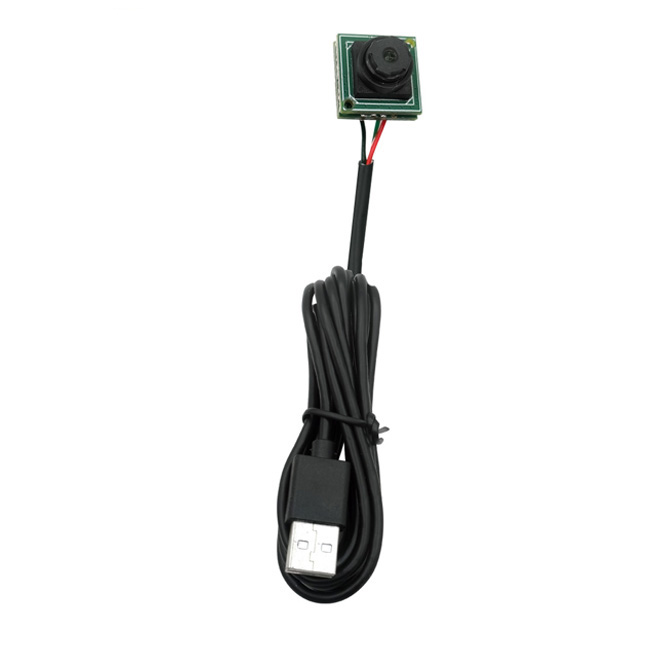
A micro USB camera core PCB is a compact UVC camera module used by existing robot hosts and embodied AI platforms that already support USB video input. It can provide 1080P visual input, USB2.0 plug-and-play integration, MJPG/YUV2 video output, DC5V power, and a small bare-board form factor for auxiliary robot vision, robot head cameras, docking-area view, gripper view, remote preview, and platform-level camera configuration.
This is not a generic webcam module page. It is written for U.S. robot teams, embodied AI device builders, and system integrators that already have a host device, USB video pipeline, mechanical space limitation, sample validation plan, and possible small-batch platform requirement.
It is not intended for teams looking to develop a full camera subsystem from zero. It is also not positioned as a SLAM camera, depth camera, global shutter motion camera, or outdoor HDR robot camera. This page focuses on compact USB visual input for existing robot hosts.
Many robot teams do not need a camera designed from zero. They already have a Linux controller, Android board, Windows industrial PC, Jetson, RK platform, edge AI host, OpenCV workflow, GStreamer pipeline, ROS video capture setup, or embedded host that can accept USB video.
For these projects, the real question is not simply:
Which USB camera has 1080P resolution?
The better question is:
Which compact USB camera core PCB can fit our existing robot structure, work with our host, support sample validation, and be configured around lens, cable, mounting, and field-of-view requirements without redesigning the full camera subsystem?
This is where a compact UVC micro USB camera module can be useful.
| Robot / AI Platform Situation | Fit Level | Why |
|---|---|---|
| Existing host supports USB UVC video | Strong fit | Plug-and-play validation is faster than custom camera board development. |
| Need a compact camera PCB for a robot head, front panel, gripper, or docking area | Strong fit | A small board-level camera helps fit tight mechanical structures. |
| Need 1080P auxiliary video | Strong fit | 2MP 1080P@30fps is enough for many non-core robot vision tasks. |
| Need Linux, Android, Windows, or embedded host compatibility | Strong fit | UVC support helps cross-platform testing. |
| Need sample testing before small-batch robot configuration | Strong fit | USB camera modules are practical for fast validation. |
| Need face/presence capture or embodied AI interaction input | Strong fit | A compact UVC camera can provide a basic visual input channel. |
| Need SLAM, depth sensing, or stereo vision | Weak fit | Depth cameras, stereo cameras, or LiDAR may be better. |
| Need high-speed motion capture | Weak fit | A global shutter camera may be more suitable. |
| Need outdoor HDR or long-distance recognition | Weak fit | Sensor, lens, exposure, and housing need separate evaluation. |
| Need deep MIPI BOM-level integration | Weak fit |
MIPI may be better for full board-level mass production design.
|
Professional robot teams often search by project problem, not by a generic camera name. These are typical questions buyers may ask in Google AI Mode, ChatGPT, Gemini, Claude, Perplexity, or Bing:
If these questions match your project, you are probably not looking for a retail webcam. You are looking for a compact camera module that can be matched to an existing robot host, mechanical space, lens FOV, cable route, and sample-to-pilot validation process.
A micro USB camera module is not always the best camera for every robot. However, for existing robot hosts, it can be one of the fastest ways to add, replace, or validate a visual channel.
For an existing Linux, Android, Windows, Jetson, RK, or industrial PC host, USB UVC can often be tested faster than MIPI camera integration. Many development teams already have USB capture pipelines, OpenCV tools, GStreamer workflows, or ROS video capture nodes.
This helps robot teams validate camera position, field of view, image format, cable routing, and mechanical fit before deciding whether they need deeper customization.
Robot head shells, front panels, gripper areas, docking sensor zones, and side-view positions often have limited mechanical space. A compact bare-board camera core can help when standard webcam-style cameras or larger camera boards are too bulky.
For teams that need a proven compact robot-ready platform, Goobuy’s UC-501 2MP Micro USB Camera Module is a practical option for 1080P UVC visual input with compact size, lens selection, and cable configuration.
A 1080P USB camera core PCB with MJPG / YUV2 output gives robot teams more flexibility during host-side validation.
MJPG can reduce USB bandwidth pressure compared with uncompressed video.
YUV2 may be preferred by some vision pipelines for direct image processing.
The best format depends on the robot host, CPU load, USB bandwidth, software pipeline, and latency requirements.
Many U.S. robot companies are not looking for a camera supplier to redesign their full vision system. They need a supplier that can help configure a camera around an existing platform.
Typical configuration points include:
This is the type of compact camera support Goobuy focuses on.
| Parameter | Typical Specification | Meaning for Robot Host Integration |
| Camera Type | Micro USB camera core PCB | Bare-board visual input for compact robot devices |
| Sensor | 1/2.9" CMOS class | Compact imaging platform |
| Pixel | 2MP | Suitable for 1080P auxiliary video |
| Resolution | 1920×1080@30fps | Mainstream preview and visual input resolution |
| Compression | MJPG / YUV2 | Flexible host-side capture options |
| Interface | USB2.0 | Suitable for existing USB host platforms |
| UVC Support | Plug-and-play | Reduces driver development burden |
| Power | DC5V | Common USB-powered embedded integration |
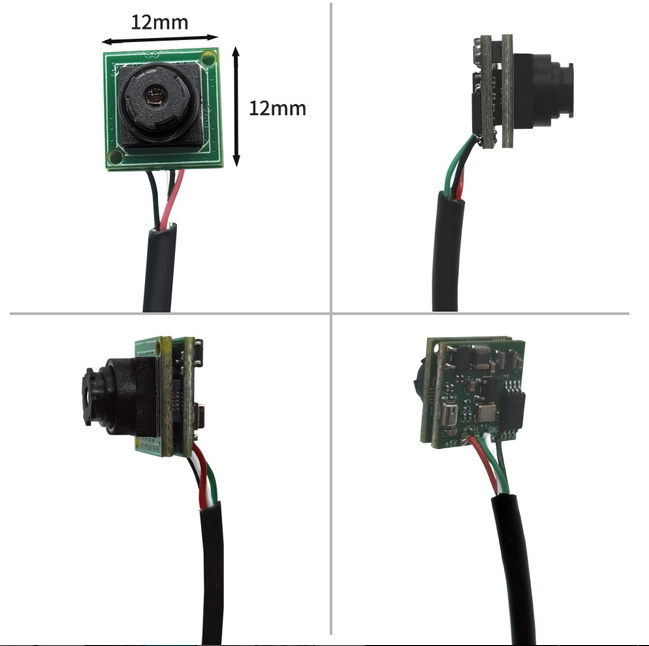
| PCB Size | 12×12mm / 15×15mm class depending on configuration | Helps fit compact robot structures |
| White Balance | Automatic | Useful for quick integration and testing |
| Audio | Optional depending on version | May be useful for interaction terminals, not core robot vision |
| Power Consumption | Low-power class | Useful for compact embedded systems |
| OS Support | Windows / Mac OS / Linux / Android | Important for robot host validation |
| Configuration Options | Lens, housing, cable length, connector, resolution family | Useful for platform-level camera matching |
Goobuy’s UC-501 platform is a compact 15×15mm class micro USB camera module direction. For smaller or special PCB constraints, project-specific compact core PCB options can be discussed depending on feasibility and quantity.
This type of micro USB camera core PCB is best positioned as an auxiliary visual input for existing robot hosts, not as a universal robot vision sensor.
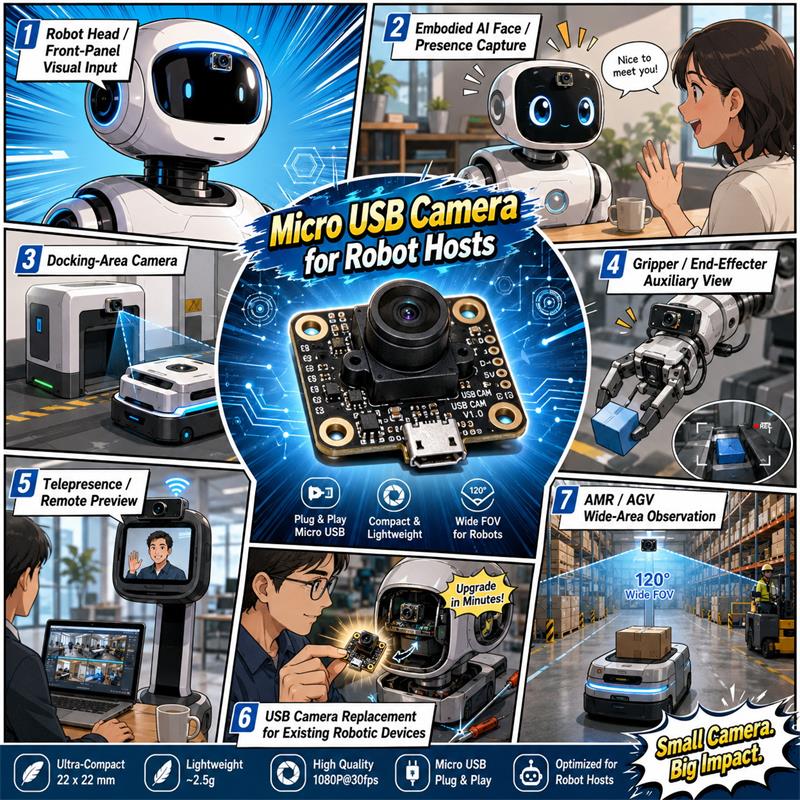
For embodied AI devices, service robots, desktop robotic agents, and interaction robots, a compact UVC camera can provide a front-facing visual channel for human presence, interaction, or remote preview.
For embodied AI devices, this camera direction is more suitable for basic visual input such as face/presence capture, front-panel interaction view, operator preview, and scene context under controlled lighting. It is not positioned as a high-performance perception sensor for autonomous navigation or manipulation.
Some robots need a small close-range camera for viewing a charging dock, target marker, alignment area, or local positioning zone. A compact USB camera can help when the host already supports USB video input.
For certain robot arms or manipulation devices, a small USB camera can provide an auxiliary close-range view near the gripper. It should not be treated as a high-speed precision motion camera, but it can support visual confirmation under controlled conditions.
A compact UVC camera can be useful when a robot or embodied AI device needs a simple video channel for remote operator preview, customer demo, status verification, or host-side testing.
Some robot platforms already use a USB camera, but the original module may be too large, discontinued, or mechanically difficult to fit. In those cases, a compact UC-501 class micro USB camera can be evaluated as a replacement direction.
The right lens depends on the robot’s visual task. A robot head camera, docking camera, gripper camera, and AMR side-view camera do not require the same field of view.
| Robot Need | Better Lens Direction |
| Human interaction / face presence | Standard or moderate wide-angle lens |
| Robot head / front-panel preview | Standard wide-angle lens |
| Docking-area view | Close-range lens with suitable FOV |
| Gripper or end-effector view | Close working-distance lens |
| Low-distortion view | Avoid fisheye unless wide coverage is more important |
| Wide-area AMR / AGV observation | Fisheye USB camera direction |
| Blind-spot reduction | Wider FOV or fisheye direction |
| Maximum wide-area coverage | UC-501-230X fisheye direction |
When the application requires an ultra-wide fisheye view rather than a standard narrow or medium FOV lens, Goobuy’s UC-501-230X Fisheye USB Camera for Robotics can be considered. It is designed for robot platforms that need a wider 230° fisheye USB camera direction for AMR, AGV, humanoid robot, and wide-area observation use cases.
For customers who are not sure whether they need a standard UC-501 2MP camera or a fisheye UC-501-230X direction, the key question is:
Do you need clearer normal-view auxiliary video, or do you need maximum wide-area coverage with fisheye distortion?
| Selection Factor | USB UVC Micro Camera | MIPI Camera |
| Best For | Existing hosts and fast validation | Deep board-level design |
| Driver Work | Usually lower | Usually higher |
| Host Compatibility | Windows / Linux / Android / Mac OS | Platform-specific |
| Prototype Speed | Faster | Slower |
| Mechanical Flexibility | Cable and connector options | FPC and board design dependent |
| Mass Production Optimization | Good for module-level configuration | Better for deep BOM integration |
| Goobuy Positioning | Platform-level camera configuration | Project-dependent deep integration |
For existing robot hosts, USB UVC can be a faster validation path. For deep robot BOM design, MIPI may still be the better long-term architecture.
This blog focuses on existing-host camera configuration, not from-scratch robot camera subsystem development.
USB2.0 is practical for many single-camera 1080P UVC applications, but robot teams should evaluate bandwidth and host processing before using multiple cameras.
Before sample testing, confirm:
MJPG can reduce USB bandwidth pressure compared with uncompressed YUV2. YUV2 may simplify raw image processing but can increase bandwidth. Multi-camera use should be tested with the real host, USB hub, cable length, and software pipeline.
For multiple 1080P cameras, higher frame rates, or heavier real-time processing, USB3.0, MIPI, GMSL, Ethernet, or another architecture may be more suitable.
Many compact 2MP USB camera modules use rolling shutter CMOS sensors. This is acceptable for many auxiliary robot viewing tasks, but it may not be suitable for motion-critical applications.
If the camera is mounted on a fast-moving robot or used to capture moving objects, rolling-shutter distortion and motion blur should be evaluated.
This camera direction is better suited for:
It is not ideal for:
For motion-critical vision, a global shutter USB camera may be more suitable.
A bare-board micro USB camera should be evaluated with the robot’s enclosure, mounting bracket, cable strain relief, vibration level, lens protection, and heat environment.
Before installing a bare-board camera in a robot, check:
If the camera is exposed outside the robot body, a housed version or mechanical protection may be required. For high-vibration industrial robots, mechanical testing is recommended before pilot deployment.
| Item | Why It Matters |
| Host OS and USB camera support | Ensures the camera can be detected and captured |
| UVC recognition | Reduces driver development risk |
| MJPG / YUV2 format | Affects bandwidth, CPU load, and processing |
| Lens FOV | Determines robot view coverage |
| Cable length / connector direction | Affects mechanical installation |
| Board size / housing | Affects robot enclosure fit |
| Multi-camera use | Affects USB bandwidth and CPU load |
| Motion scene | Rolling shutter may affect moving images |
| Mounting protection | Bare PCB needs mechanical protection |
| Lighting condition | Affects image quality and exposure stability |
| Sample quantity and pilot plan | Determines whether configuration support is realistic |
Actual recognition, frame rate, image format stability, and software capture behavior should be tested on the buyer’s real robot host.
A micro USB camera core PCB may not be suitable for every robot vision requirement.
It is not ideal for:
If your project requires motion-critical machine vision, outdoor HDR, depth sensing, or high-speed robot navigation, a different camera architecture may be more suitable.
Goobuy can help U.S. robot companies, embodied AI platform teams, and system integrators evaluate compact USB camera directions when the buyer already has a host device and a real validation plan.
Project-dependent support may include:
Goobuy is not positioning this product direction as a full robot vision system. It is better understood as a compact USB visual input platform for existing robot hosts and embodied AI devices.
Cable length, connector direction, lens, housing, and mounting configuration are project-dependent and should be confirmed during sample evaluation. Some changes may require MOQ, engineering review, or paid NRE.
To help us recommend the right micro USB camera direction, please send:
If you already have a robot host and need a compact USB camera for auxiliary vision, embodied AI interaction, docking view, gripper view, telepresence preview, or small-batch platform configuration, Goobuy can help evaluate whether UC-501 2MP, UC-501-230X, or another compact USB camera direction is more suitable.
A micro USB camera core PCB is not just a small camera board. For the right U.S. robot company or embodied AI platform team, it can be a fast way to add a compact visual input to an existing host without redesigning the full camera subsystem.
The standard UC-501 2MP direction is suitable when the project needs compact 1080P UVC visual input, lens selection, cable configuration, and quick host validation.
The UC-501-230X fisheye direction is more suitable when the robot needs a wider view for AMR, AGV, humanoid robot, or wide-area observation use cases.
For Goobuy, this product direction is part of a broader compact USB camera platform for physical AI vision, robot auxiliary vision, embodied AI devices, and existing-host camera configuration.
Professional FAQ: Micro USB Camera Core PCB for Existing Robot Hosts
1. What small USB camera PCB can we add to an existing robot host?
A compact UVC micro USB camera module can be added to an existing robot host if the host supports USB video input and the camera fits the robot’s mechanical space, lens FOV, cable route, and software workflow. Goobuy’s UC-501 2MP platform can be considered for compact 1080P UVC visual input.
2. Is this page about a generic webcam module or a robot camera module?
This page is not about retail webcam accessories. It is written for robot teams that already have a host device, USB video pipeline, mechanical space limitation, and sample-to-pilot validation plan. The camera is positioned as an auxiliary visual input for existing robot hosts, not as a complete robot vision system.
3. Is 2MP 1080P enough for auxiliary robot vision?
2MP 1080P can be enough for many auxiliary robot vision tasks such as robot head video, front-panel preview, docking-area view, gripper confirmation, embodied AI interaction view, and remote preview. It is not enough for every robot vision task, especially depth sensing, SLAM, high-speed obstacle avoidance, or precision inspection.
4. Can a 1080P USB2.0 camera module work with a Linux robot controller?
It may work if the camera is UVC-compatible and the Linux host supports USB video capture. Robot teams should test UVC recognition, MJPG/YUV2 format, frame rate stability, OpenCV/GStreamer/ROS capture behavior, USB bandwidth, and cable length on the real host before pilot deployment.
5. Can a UVC camera module work with OpenCV, GStreamer, or ROS video capture?
UVC cameras are commonly used with OpenCV, GStreamer, and ROS video capture workflows, but actual recognition, frame rate, and format stability should be tested on the buyer’s real host system. Goobuy recommends sample validation before small-batch robot configuration.
6. Should we use USB UVC or MIPI camera for an embodied AI robot prototype?
For an existing host and fast prototype validation, USB UVC can be easier and faster to test. For deep BOM-level board design, MIPI may be better in long-term mass production. If the project already has a USB video pipeline and needs quick validation, a UVC micro USB camera can be a practical direction.
7. When should a robot use a fisheye USB camera instead of a standard USB camera?
A robot should consider a fisheye USB camera when it needs maximum wide-area coverage, blind-spot reduction, AMR/AGV observation, or a wider humanoid robot visual field. If the project needs clearer normal-view auxiliary video with less distortion, a standard UC-501 2MP direction may be more suitable than a fisheye lens.
8. Is USB2.0 enough for multi-camera robot vision?
USB2.0 may be enough for a single 1080P UVC camera and some low-complexity setups, especially with MJPG output. For multiple 1080P cameras, higher frame rates, or low-latency processing, USB bandwidth and CPU load must be tested. USB3.0, MIPI, GMSL, Ethernet, or another architecture may be better for multi-camera systems.
9. Will rolling shutter affect robot vision?
Rolling shutter can affect fast-moving scenes, moving objects, or cameras mounted on fast-moving robots. For auxiliary viewing, docking observation, gripper confirmation, or interaction view, it may be acceptable. For motion-critical vision, high-speed capture, or precise moving-object measurement, a global shutter camera may be more suitable.
10. What mechanical issues should we check for a bare-board robot camera?
Robot teams should check PCB space, lens clearance, mounting method, cable routing, connector direction, cable strain relief, vibration exposure, lens protection, heat environment, and whether a housed version is required. Bare-board cameras need mechanical protection if exposed outside the robot body.
11. Can Goobuy adjust lens, cable, connector, or housing for a robot project?
Lens, cable length, connector direction, housing, and mounting configuration may be discussed depending on project quantity, technical feasibility, and selected platform. Some changes may require MOQ, engineering review, or paid NRE after sample validation.
12. What is the difference between UC-501 2MP and UC-501-230X for robot applications?
UC-501 2MP is better for compact 1080P UVC visual input, normal-view auxiliary video, lens selection, and small robot host integration. UC-501-230X is better when the robot needs a wider fisheye view, such as AMR, AGV, humanoid robot, or wide-area observation use cases.
13. Is this camera suitable for SLAM or depth sensing?
No. This micro USB camera direction is not recommended as a SLAM camera, depth camera, stereo camera, or main navigation sensor. It is better suited for auxiliary robot vision, existing-host visual input, remote preview, docking view, gripper view, and embodied AI interaction under controlled conditions.
14. What should we send before requesting samples?
Please send the robot type, host system, OS, USB UVC support, camera position, available mechanical space, required FOV, standard or fisheye view requirement, cable length, connector direction, video format preference, number of cameras, motion condition, lighting condition, sample quantity, pilot batch plan, and any mechanical or lens customization needs.
15. Can Goobuy support paid NRE for robot camera configuration?
Paid NRE may be discussed when standard modules cannot fully match the mechanical, cable, lens, housing, connector, or firmware-related requirement. Goobuy usually recommends starting with standard sample validation before discussing micro customization or NRE.
16. What type of customer is the best fit for this micro USB camera direction?
The best-fit customer is a U.S. robot company, embodied AI platform team, system integrator, or existing robotic device maker that already has a host device, USB video pipeline, mechanical requirement, sample validation plan, and potential pilot batch or platform configuration need.
Follow Me
Address:A615, 6F, Huachuangda Building, No107 Xinghua 1st Road, 43 District, Xinan street, Baoan, shenzhen, China 518101