

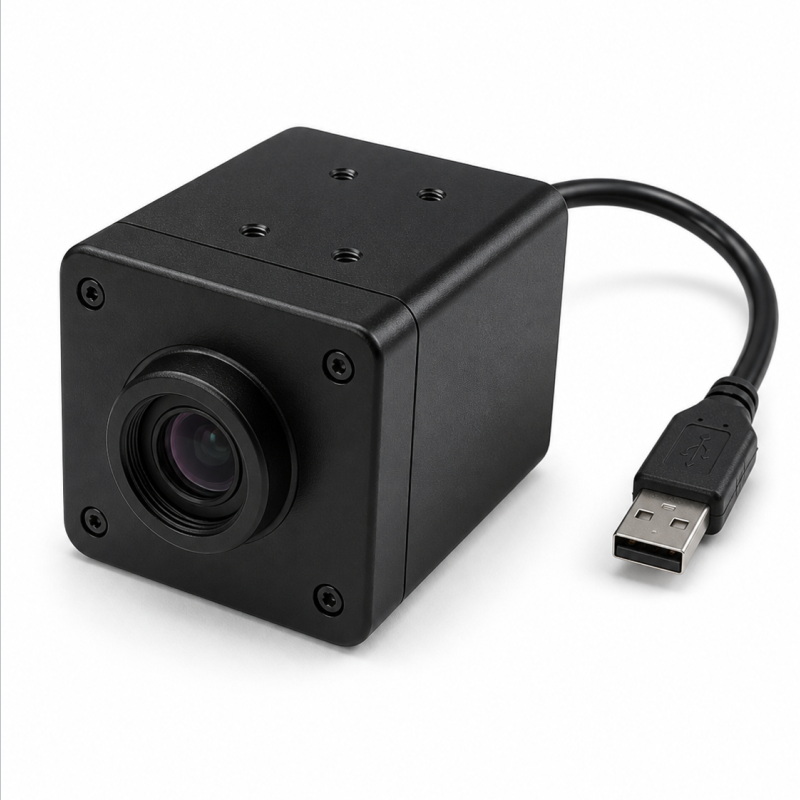
Built for commercial golf swing replay and coaching bay deployment. A housed motion replay camera designed for practical installation, cable routing, and real project use
Goobuy USB Swing Camera is a housed high-speed motion replay camera used in commercial golf coaching bays to capture clearer swing video for replay, review, and analysis with a practical installation and cable-ready workflow
Built for commercial golf swing replay, this housed USB Swing Camera helps coaching bays, simulator installers, and multi-bay operators deploy a more practical motion replay workflow without relying on a generic webcam setup
If your project needs a practical USB Swing Camera for real commercial deployment, not just a webcam and not a bare industrial module, this product is built for that role.
This housed High-Speed Motion Replay USB Camera is designed primarily for golf swing replay in commercial swing replay bays, coaching studios, indoor golf training environments, and simulator installations. It is also suitable for selected baseball / softball motion replay projects where fast bat movement and body mechanics need to be reviewed more clearly.
Instead of positioning this product as a generic AR0234 camera, we position it as a practical swing replay camera for real installation, repeatable setup, and easier project evaluation.
It is built as a USB Swing Camera for Customer who want a more practical golf video analysis camera for real projects, especially in:
This product is built first for one commercial purpose:
to serve as a practical golf swing replay camera in real coaching bays and commercial swing replay environments.
It is best suited for:
It is not intended to be:
This is a product page for buyers who already understand the value of a swing replay camera and want a more deployable, commercial-ready solution.
This is a Golf-first product.
The strongest fit is the U.S. commercial golf market, where installers, coaching operators, and multi-bay training facilities need a USB Swing Camera that feels practical in real deployment.
Professional golf replay buyers usually care about:
That is exactly why this page is written around the language of a USB Swing Camera, commercial training bay camera, and global shutter golf camera, instead of generic industrial imaging language.
This product is primarily a golf replay camera, but it also fits selected baseball / softball motion replay needs.
For batting and swing review projects, some buyers need a baseball swing replay camera or batting analysis camera that is more suitable for fast motion than a standard webcam, but easier to deploy than a more complex industrial setup.
This is not positioned as a full biomechanics lab system or a complex research rig.
It is positioned as a practical High-Speed Motion Replay USB Camera for coaching and training review.

A swing replay camera is not judged the same way as a normal USB camera.
In swing replay, buyers want more than “a visible image.”
They want a replay that feels trustworthy during fast motion.
That is where a global shutter golf camera becomes relevant.
Global shutter helps reduce the image distortion commonly associated with rolling-shutter capture in fast-moving scenes. In practical terms, that makes the replay more useful when reviewing club movement, body position, and timing.
At the same time, serious buyers know that replay quality is not determined by one specification alone. Real replay quality also depends on:
So the real value here is not “global shutter” in isolation.
The real value is a more practical replay result in a real coaching bay deployment.
A real commercial swing replay bay project always includes more than the camera body itself.
It also includes:
This is why the product should be evaluated not only by frame rate, but also by:
If you are planning a multi-bay commercial deployment, it is best to define working distance, cable length, mounting style, and host location before sample shipment.
That makes the sample evaluation much more realistic and useful.
Not every replay project uses the same balance of detail and motion smoothness.
For practical deployment, this camera supports common project thinking such as:
For many buyers, the most useful evaluation question is not:
“What is the maximum spec?”
It is:
“What replay mode makes the most sense for our bay layout, lighting, and coaching workflow?”
This is the mindset this High-Speed Motion Replay USB Camera is built around.
Not every buyer wants a closed branded camera ecosystem.
Some want a more flexible open workflow swing camera that can be used in a practical replay setup without being locked into one hardware path.
This page is especially relevant for buyers who are:
This does not mean every branded workflow is automatically supported.
It means this camera is positioned for buyers who want more deployment flexibility when evaluating a USB Swing Camera.
Take control of your training with goobuy USB Swing Camera. Capture every swing in high-speed replay for clearer coaching feedback and practical bay-side video analysis
| Item | Specification |
|---|---|
| Video Resolution | 1920 × 1080 |
| Frame Rate | 90 Frames Per Second |
| Resolution | 1080P/2MP |
| optional lens | EFL 1.7mm/2.1/2.5/2.8/2.8-12mm varifocal or specified |
| Type | Video Camera |
| Camera bracket | optional purchase/available |
| Camera Type | Golf Swing Camera |
| Interface | USB2.0 Interface |
| Wired Connectivity | USB cable 1-5meter |
| Top Use Cases | Golf swing analysis |
| Typical Users | Golf coaching bay, simulator installer, training facility |
| Highlighted Features | Plug-and-Play USB Interface, Global Shutter Technology |
Choosing the right lens is not only an optical decision.
In a real commercial swing replay bay, lens selection directly affects:
That is why lens selection should always be matched to your real bay layout, mounting distance, and replay goal.
A wider field of view is usually the better starting point when the camera must be installed closer to the player.
This is often the right choice for:
In these setups, the priority is usually to keep the golfer fully visible while maintaining a practical replay angle.
A mid-range lens direction is usually the most balanced option for many golf swing camera projects.
This is often the best fit when:
For many commercial projects, this is the most useful starting point for sample evaluation.
A narrower or more flexible lens setup becomes more useful when the camera must be mounted farther away or when the buyer wants tighter replay framing.
This is often the right direction for:
In these cases, a more flexible lens option can help the camera remain practical even when the bay geometry is less forgiving.
Lens choice should also reflect camera position.
Side-view placement usually needs:
Down-the-line placement often benefits from:
This is why one lens approach is not always ideal for every bay.
To recommend a more suitable lens direction for your USB Swing Camera project, please send us:
With this information, we can recommend a more suitable lens path for your first sample instead of sending a generic configuration.
This product is built primarily for commercial buyers, not casual consumers. The strongest fit is for simulator installers, coaching bay operators, indoor training facilities, service providers, and buyers evaluating a more practical swing replay camera for real deployment.
This is primarily a golf swing camera and High-Speed Motion Replay USB Camera. Golf is the main intended market. Baseball / softball motion replay is a secondary fit, not the main focus.
A generic webcam is easy to buy, but often a weak fit for fast swing replay. This product is positioned as a more practical global shutter golf camera for coaching and replay environments where motion readability, installation logic, and repeatable deployment matter more.
No. This is not presented as a launch monitor core sensor. It is positioned as an external USB Swing Camera for replay, coaching, and motion review workflows.
Yes, that is exactly the kind of real-world deployment question this page is written for. The right setup depends on mounting distance, field of view, and whether the project is side-view or down-the-line. That is why project details matter before sample shipment.
This product is positioned as a practical plug-and-play swing replay camera for buyers who want lower-friction evaluation. The exact workflow still depends on your host platform, cable strategy, and replay software environment, so we recommend discussing your project setup before sample shipment.
It is positioned for buyers who want to build or evaluate this kind of swing replay workflow. If your project involves slow-motion review, multi-angle replay, side-by-side comparison, or overlay-style coaching analysis, tell us your intended workflow so we can judge whether this camera is the right fit.
Yes, especially for buyers who want a more flexible deployment path. This page is designed for projects evaluating a swing camera alternative to more branded or closed hardware ecosystems while still wanting a practical USB Swing Camera for commercial replay work.
Most installers care about housing, mounting style, cable length, extension requirements, recommended placement distance, multi-bay repeatability, and serviceability. That is why this page emphasizes deployment reality, not only imaging specifications.
Please send your project type, whether it is golf or baseball, side-view or down-the-line requirement, working distance, preferred field of view, host platform, expected cable length, expected annual volume, and whether you need standard supply or customized supply. That helps us recommend a more suitable camera and cable setup for your project.
To recommend the right camera configuration, please send us:
With this information, we can recommend a more suitable housed camera setup and cable strategy instead of sending a generic sample.
This page is built for buyers who think in terms of:
coaching bay installation
swing replay workflow
multi-bay repeatability
longer cable runs
open workflow evaluation
commercial deployment reality
That is why the product is presented as a USB Swing Camera, swing replay camera, and golf video analysis camera—not simply as another global shutter sensor page.
 office@okgoobuy.com
Follow Me
Address:A615, 6F, Huachuangda Building, No107 Xinghua 1st Road, 43 District, Xinan street, Baoan, shenzhen, China 518101