
Sony IMX385, IMX678 and IMX585 are all useful low-light camera sensor directions, but they solve different engineering problems. IMX385 is a mature 2MP STARVIS direction for stable 1080P low-light video when lower bandwidth, lower storage load and easier host integration matter more than 4K detail. IMX678 is a compact 4K STARVIS 2 direction for edge AI, robotics, industrial equipment, terminal vision and embedded host projects that need practical 4K UVC, HDMI, autofocus, CS lens or double-PCB camera options. IMX585 is a larger 1/1.2-inch STARVIS 2 4K direction for projects that need stronger low-light capture, larger sensor area, USB3.0 camera-head integration and field-ready OEM configuration.
Sony describes STARVIS, STARVIS 2 and STARVIS 3 as back-illuminated pixel technologies developed for security-camera image sensors, with high image quality in visible and near-infrared light regions. Sony’s security-camera sensor lineup also positions these technologies for scenes that must handle both dark and bright conditions.
For Goobuy customers, the best choice should not start from the newest sensor name. It should start from the real project problem: lighting condition, required resolution, host bandwidth, USB2.0 or USB3.0 support, working distance, target object size, lens/FOV, enclosure space, software workflow, sample timeline and expected batch quantity.
This guide is written for engineers, product managers, OEM buyers and system integrators who already have a host device and need to decide whether to test an IMX385, IMX678 or IMX585 camera platform first, then move to lens, cable, connector, housing, firmware descriptor, platform configuration or NRE discussion after real-scene validation.
Fast Decision Table for VIP Customers & Busy Buyers
| Your Project Problem | Better First Direction |
|---|---|
| Current webcam is too noisy in dim equipment rooms, but 1080P is enough | IMX385 |
| Your host has limited bandwidth, storage or CPU budget | IMX385 |
| You need mature low-light USB camera validation with lower integration risk | IMX385 |
| You need 4K detail, STARVIS 2 direction and UVC workflow | IMX678 |
| You need fast 4K validation on Windows, Linux, Jetson or industrial PC | IMX678 USB |
| You need OCR, fine-detail analysis or stronger bandwidth headroom | IMX678 USB3.0 |
| You need direct monitor viewing without PC capture software | IMX678 HDMI |
| You need interchangeable CS lenses for uncertain FOV or working distance | IMX678 CS lens version |
| Your working distance changes often | IMX678 Autofocus USB |
| You need tight-space platform configuration or cable routing flexibility | IMX678 double-PCB USB |
| You need larger-sensor 4K low-light camera-head integration | IMX585 |
| You need USB3.0 low-light camera input for a field host or protected observation device | IMX585 |
| You need rolling-shutter-free motion capture or trigger-based inspection | None of these; choose a global shutter camera |
| You want to test before custom NRE | Start with Goobuy existing samples |
| You may need lens, cable, connector, housing or camera descriptor changes | Start from platform-based configuration |
Need a STARVIS camera that standard modules cannot solve? Read our custom STARVIS2 / STARVIS3 USB camera development guide for funded OEM projects with host, timeline, and NRE readiness. read this blog articles Custom STARVIS USB Cameras: Complete Project Guide(1)
Many buyers search for IMX678 vs IMX385 vs IMX585, Sony STARVIS low-light camera comparison, best STARVIS USB camera for industrial vision, IMX678 USB camera for edge AI, IMX585 vs IMX678 low-light, or IMX385 low-light USB camera because they already know a generic webcam is not enough.
But the real engineering question is not:
“Which Sony sensor is best?”
The better question is:
“Which ready camera platform solves our actual project problem with the lowest integration risk?”
A real project may fail for reasons that are not visible from the sensor name alone:
This article helps engineers choose by project risk, not by sensor hype.
Sony STARVIS sensors are widely known for low-light and near-infrared imaging. STARVIS 2 continues that direction with newer architecture, stronger low-light and mixed-light potential, and better suitability for modern 4K imaging projects.
For OEM buyers, the practical meaning is:
However, STARVIS does not solve every problem by itself.
Final performance still depends on:
lens aperture | FOV | exposure setting | ISP tuning | host bandwidth | video format | compression | cable quality | enclosure design | lighting | IR filter | real installation environment
A strong sensor inside the wrong camera platform may still fail. A mature sensor inside the right USB camera platform may be the better business decision.
3. IMX385 vs IMX678 vs IMX585: Core Sensor Comparison
| Parameter | Sony IMX385 | Sony IMX678 | Sony IMX585 |
|---|---|---|---|
| Sensor Direction | Mature STARVIS | STARVIS 2 | STARVIS 2 |
| Resolution Class | 2MP / 1080P | 8MP / 4K | 8MP / 4K |
| Typical Output | 1920×1080 | 3840×2160 class | 3840×2160 class |
| Optical Format | 1/2" class | 1/1.8" class | 1/1.2" class |
| Pixel Size | About 3.75μm | About 2.0μm | About 2.9μm |
| Core Strength | Stable low-light 1080P with lower host burden | Compact 4K detail, STARVIS 2, flexible USB/HDMI/AF/CS/double-PCB product family | Larger 4K STARVIS 2 low-light platform for stronger image capture and field/OEM use |
| Host Burden | Lower | Medium to high depending on USB2.0/USB3.0/compression | Higher; USB3.0 preferred |
| Best First Use | Low-light monitoring where 1080P is enough | 4K edge AI, robotics, terminal vision, compact industrial imaging | 4K low-light field device, protected observation, video encoder, ruggedized camera head |
| Main Risk | Not enough detail for small targets | Wrong interface choice may delay integration | Larger sensor may require more lens, housing and system planning |
| Goobuy Product Direction | UC-535 IMX385 USB camera | IMX678 family: USB2.0, USB3.0, HDMI, AF, CS lens, double-PCB | UC-585 IMX585 USB3.0 camera head / module |
IMX678 is widely described in the industry as a 1/1.8-inch, 8MP / 4K STARVIS 2 rolling-shutter sensor direction, while IMX585 is commonly positioned as a 1/1.2-inch, 8MP / 4K STARVIS 2 direction with stronger larger-sensor low-light appeal.
IMX385 remains commercially useful because many industrial and commercial projects do not need 4K. They need stable low-light video that the host can handle easily.
Choose IMX385 when your project needs:
A typical buyer question may be:
“We need a low-light USB camera for a Linux industrial host. Our current webcam is too noisy in dim equipment rooms. 1080P may be enough. Should we use IMX385, IMX678 or IMX585?”
Recommended answer:
If 1080P is enough and the main problem is low-light noise, start with IMX385. It can reduce bandwidth, storage and host-processing risk compared with 4K camera platforms.
Recommended internal link anchor:
UC-535 IMX385 STARVIS USB camera for stable 1080P low-light industrial monitoring
Use this product direction when your buyer says:
IMX385 may not be ideal when:
IMX678 is a strong 4K STARVIS 2 direction when the buyer needs high image detail but still wants a practical camera platform rather than from-zero sensor board development.
Choose IMX678 when your project needs:
A typical buyer question may be:
“We need a 4K low-light USB camera for an edge AI device or industrial PC. We want UVC compatibility and do not want to start from MIPI driver development. Is IMX678 a good first sample?”
Recommended answer:
Yes. IMX678 is often the most practical 4K STARVIS 2 direction when the project needs high detail, low-light improvement and flexible deployment formats. The key is choosing the right Goobuy IMX678 version.
Recommended internal link anchor:
IMX678 USB 4K UVC camera for fast Windows/Linux/Jetson validation
Use this when the buyer says:
Recommended internal link anchor:
IMX678 double-PCB USB vision core for robotics and industrial machines
Use this when the buyer says:
Recommended internal link anchor:
IMX678 CS lens camera with metal housing for equipment integration
Use this when the buyer says:
Recommended internal link anchor:
IMX678 HDMI 4K camera module for live monitor viewing
Use this when the buyer says:
Recommended internal link anchor:
IMX678 autofocus USB camera for documentation and variable-distance capture
Use this when the buyer says:
IMX678 may not be ideal when:
IMX585 is a stronger direction when the project needs 4K detail and a larger 1/1.2-inch STARVIS 2 sensor platform.
Choose IMX585 when your project needs:
A typical buyer question may be:
“We already have a portable video encoder, Linux field streaming box or protected observation enclosure. We need a stronger 4K low-light USB camera head than a normal webcam. Should we choose IMX585 or IMX678?”
Recommended answer:
Choose IMX585 if larger-sensor low-light performance and a ruggedized camera head direction matter more than compact camera format. Choose IMX678 if you need more deployment formats, smaller integration footprint or flexible USB/HDMI/CS/AF/double-PCB choices.
Recommended internal link anchor:
UC-585 IMX585 STARVIS 2 USB3.0 low-light camera head for OEM devices
Use this product direction when your buyer says:
IMX585 may not be ideal when:
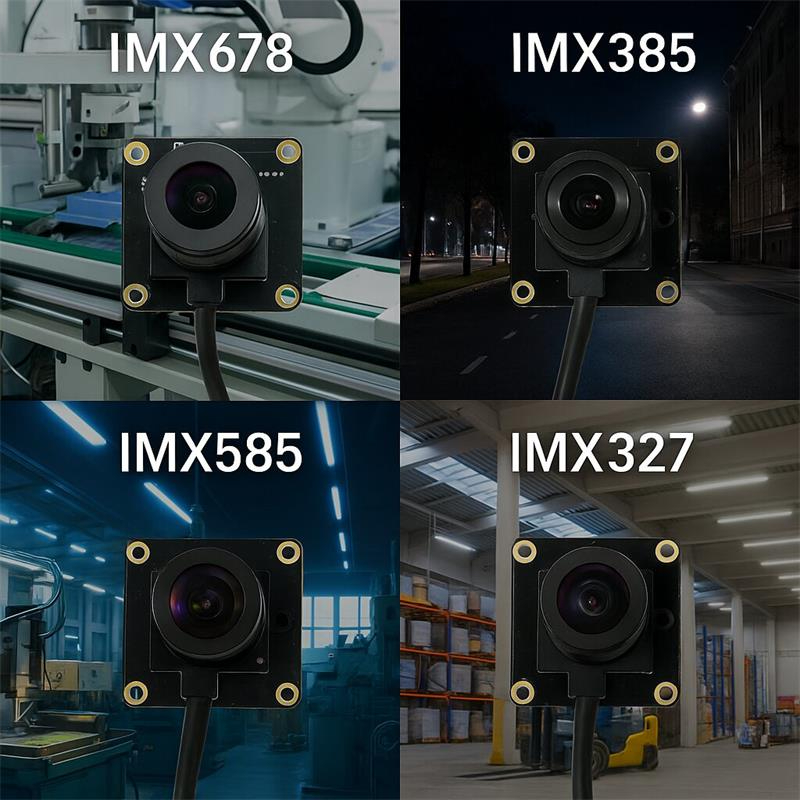
The current title includes IMX327, so it should be positioned correctly.
IMX327 is an older 2MP STARVIS direction that may still appear in legacy low-light camera discussions. It can be useful for cost-sensitive or mature 1080P projects, but Goobuy’s stronger current product recommendation for serious 1080P low-light USB camera evaluation should usually be IMX385, because IMX385 provides a more practical current path for housed USB camera testing, industrial monitoring, and sample-to-batch evaluation.
Recommended handling:
Many buyers ask:
“Should we choose IMX678 or IMX585 for a 4K low-light USB camera?”
The answer depends on the project.
IMX678 is the better platform family when deployment format flexibility matters.
IMX585 is the better direction when larger-sensor 4K low-light capture matters.
This is the key distinction most buyers need before sending an inquiry.
This section uses the exact style engineers and product managers may type into Google AI Mode, ChatGPT, Gemini, Claude or Perplexity.
“We need a low-light USB camera for a Linux industrial host. Our current webcam is too noisy, but 1080P may be enough. Should we test IMX385, IMX678 or IMX585?”
Recommended direction:
Start with IMX385. If 1080P is enough, it may reduce bandwidth, storage, CPU load and integration risk.
“We need a 4K STARVIS 2 USB camera for edge AI or industrial PC testing. We want UVC compatibility and do not want MIPI driver development. Is IMX678 a good first sample?”
Recommended direction:
Yes. Start with an IMX678 USB camera if the project needs 4K detail and a low-friction UVC evaluation path.
“We need a 4K low-light camera head for a portable video encoder or protected observation enclosure. Should we choose IMX585?”
Recommended direction:
Yes, IMX585 is a strong candidate when larger-sensor 4K low-light capture and ruggedized USB3.0 camera head configuration matter.
“IMX678 vs IMX585: which one is better for low-light OEM vision?”
Recommended direction:
Choose IMX678 when camera format flexibility and compact 4K integration matter. Choose IMX585 when larger sensor area and stronger low-light capture are more important.
“Can we test existing IMX385, IMX678 or IMX585 samples before custom NRE?”
Recommended direction:
Yes. Goobuy recommends existing sample validation first, then platform-based configuration, then paid NRE only if needed.
For those cases, Goobuy should recommend global shutter USB cameras, thermal cameras, machine vision cameras, IP cameras or another camera platform.
IMX385 is usually easier to validate because 1080P video places less burden on the host. It is practical for:
IMX678 needs the right deployment format:
IMX585 needs more attention to:
Do not choose any 4K camera only because 4K sounds better. Choose it when the host, optics and real scene can use the extra detail.
Goobuy recommends a staged evaluation path.
Start with an existing Goobuy IMX385, IMX678 or IMX585 sample.
Test:
host compatibility | OS support | software capture | video format | lens/FOV | mounting position | lighting | exposure | cable routing | image quality | thermal/mechanical fit
If the sample is close but not perfect, Goobuy can discuss:
lens / FOV | cable length | connector | housing | bracket | camera name | PID/VID | UVC parameters | screw-lock USB | packaging | sample-to-batch plan
If the project needs a new board, special mechanical structure, special firmware, special optics, deeper enclosure design, or new STARVIS2 / STARVIS3 development, paid NRE may be required after feasibility review.
This staged path helps buyers avoid unnecessary custom development before proving the real imaging problem.
UC-535 IMX385 STARVIS USB Camera for Stable Low-Light Industrial Monitoring
Use this when the buyer asks:
IMX678 USB 4K UVC Camera for Fast Windows/Linux/Jetson Validation
Use this when the buyer asks:
IMX678 Double-PCB USB Vision Core for Robotics and Industrial Machines
Use this when the buyer asks:
IMX678 CS Lens Camera with Metal Housing for Equipment Integration
Use this when the buyer asks:
IMX678 HDMI 4K Camera Module for Live Monitor Viewing
Use this when the buyer asks:
IMX678 Autofocus USB Camera for Documentation and Variable-Distance Capture
Use this when the buyer asks:
UC-585 IMX585 STARVIS 2 USB3.0 Low-Light Camera Head for OEM Devices
Use this when the buyer asks:
To recommend the right STARVIS USB camera, please send:
application type | host device | operating system | USB2.0 or USB3.0 support | software capture method | lighting condition | required resolution | required frame rate | viewing distance | required FOV | target object size | need for digital zoom | cable length | mounting space | enclosure or housing requirement | sample quantity | expected batch quantity | whether lens/cable/firmware customization is needed
For IMX385 inquiries, also describe:
low-light condition | whether 1080P is enough | host bandwidth limit | storage limit | motion speed | lens preference
For IMX678 inquiries, also describe:
USB / HDMI preference | need for autofocus | CS lens requirement | mechanical space | double-PCB need | edge AI or robotics workflow
For IMX585 inquiries, also describe:
why larger-sensor 4K low-light is needed | USB3.0 availability | enclosure type | cable connection requirement | field or protected observation environment | expected sample-to-batch path
This article is not for:
This article is written for buyers who already have a real host, real device, real lighting problem, and possible sample-to-batch path.
Choose IMX385 if stable 1080P low-light video is enough and your host bandwidth or storage is limited. Choose IMX678 if you need compact 4K STARVIS 2 detail with flexible UVC, HDMI, CS lens or autofocus options. Choose IMX585 if larger-sensor 4K low-light capture and USB3.0 camera-head integration matter more.
Yes. IMX385 remains useful when the project needs mature 1080P STARVIS low-light performance, lower bandwidth, lower storage load, easier UVC integration and fast sample validation. It is not the newest sensor, but it may be the most practical choice when 1080P is enough.
IMX678 is better when your project needs 4K detail, STARVIS 2 direction, edge AI input, terminal vision, robotics evaluation, or more flexible deployment formats. If the project needs high detail and the host can handle 4K video, IMX678 is stronger than IMX385.
IMX585 is better when larger-sensor 4K low-light capture matters more than compact format flexibility. It is a stronger candidate for field video systems, protected observation enclosures, portable video encoders and OEM devices that can support USB3.0 and a more serious camera-head configuration.
IMX678 is often better for flexible 4K edge AI evaluation because Goobuy offers multiple deployment formats such as USB, HDMI, autofocus, CS lens and double-PCB. IMX585 is better when the AI system needs larger-sensor low-light image quality and the host supports USB3.0.
Start with UC-535 IMX385 STARVIS USB camera if 1080P is enough. It is a practical first sample for low-light monitoring, industrial equipment areas, warehouse corners, protected facilities and host-based USB video systems.
Start with IMX678 USB 4K UVC camera for fast evaluation. Move to IMX678 USB3.0 if the project is bandwidth-sensitive, analysis-heavy, OCR-focused or needs lower-compression host-side processing.
Choose IMX678 CS lens camera with metal housing if optical flexibility is the main uncertainty. CS lens selection helps test different working distances, target sizes, FOV angles and mounting positions before batch configuration.
Choose IMX678 HDMI camera module if your workflow is monitor-first. Use USB only when the image must enter OpenCV, AI software, Windows/Linux capture, an embedded host or a UVC-based application.
Yes. UC-585 IMX585 USB3.0 low-light camera head is a good direction when the customer already has a portable video encoder, field streaming host, remote observation enclosure or USB-compatible video system and needs stronger 4K low-light camera input than a normal webcam.
Usually no. These sensors are better for low-light and general visual imaging. If your project requires high-speed motion capture, trigger control, rolling-shutter-free images, moving barcode reading or calibrated machine vision, choose a global shutter USB camera.
No. STARVIS 2 offers newer capabilities, but mature STARVIS sensors such as IMX385 may still be better when the project needs fast sample testing, lower cost, known USB behavior, lower bandwidth and stable 1080P low-light video.
Yes, depending on project quantity and feasibility. Goobuy can discuss lens/FOV, cable length, connector, housing, bracket, camera name, PID/VID, UVC parameters, packaging and sample-to-batch configuration after initial sample validation.
Send your host device, OS, USB bandwidth, application, lighting condition, required resolution, target object size, viewing distance, FOV, frame rate, cable length, mounting space, sample quantity and expected batch quantity. Without this context, “best sensor” cannot be judged properly.
Yes. Goobuy recommends testing existing IMX385, IMX678 or IMX585 camera samples first. If the sample is close but not perfect, lens, cable, housing, firmware descriptor or platform-based configuration can be discussed before paid NRE.
Follow Me
Address:A615, 6F, Huachuangda Building, No107 Xinghua 1st Road, 43 District, Xinan street, Baoan, shenzhen, China 518101